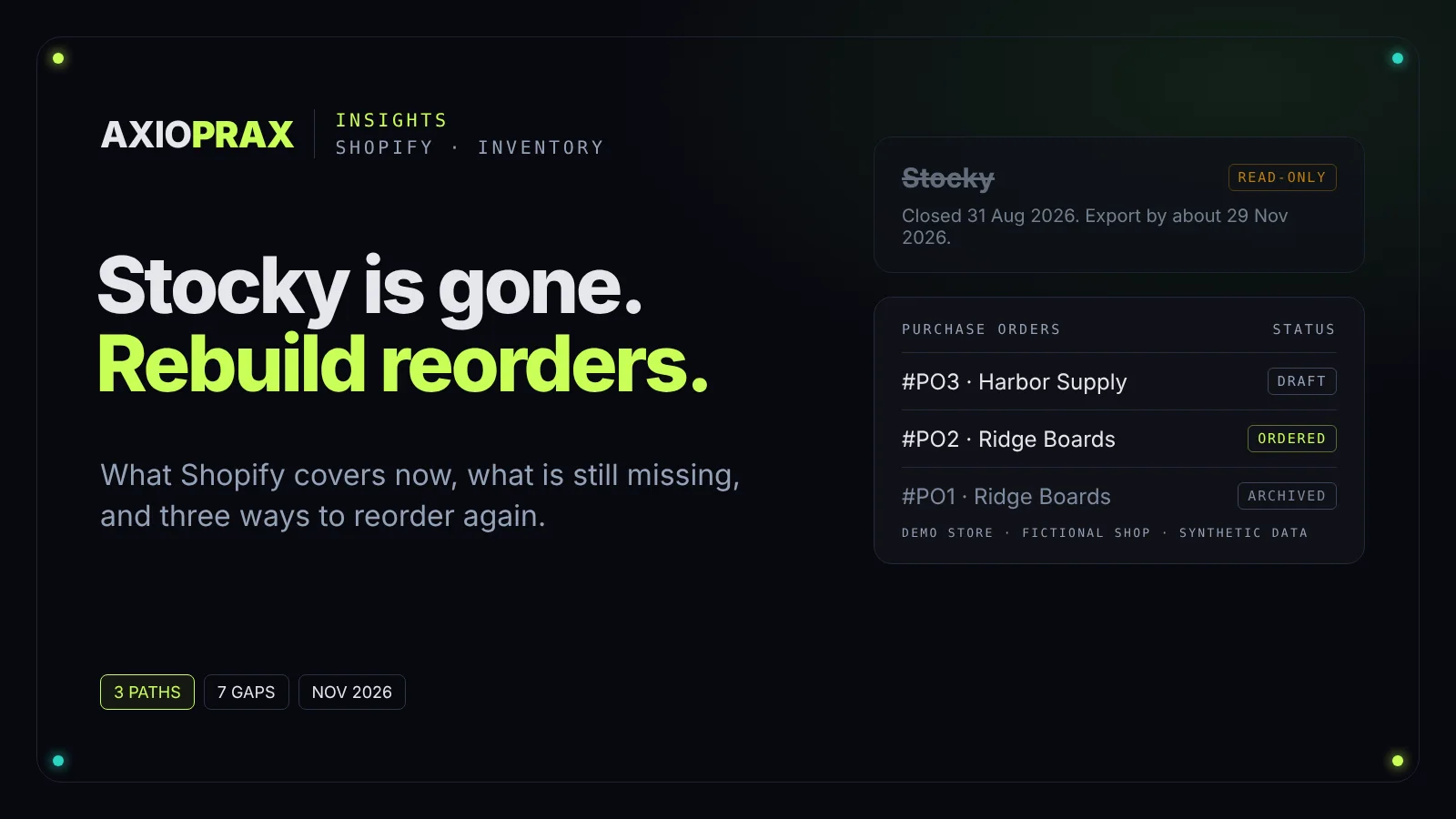
Stocky used to answer three questions when you raised a purchase order: what to order, from whom, and how many. That screen is gone. Shopify says Stocky is no longer available as of 31 August 2026, its APIs stopped working that day, and merchants have read-only access to export their data for at least 90 days after (Shopify Help Center, migrating from Stocky). Shopify gives no end date, so the safe reading is that the export window closes no earlier than about 29 November 2026.
This piece maps what Stocky did for reordering, what Shopify gives you in the admin today, what is still missing, and three ways to rebuild the routine. Where we tested something, it was on Northfield Outfitters, our own Shopify development store, with a fictional shop and synthetic data. There are no client results here.
What exactly did Stocky do for reordering?
Stocky forecast the stock you needed and suggested which products to order. Shopify describes it as an inventory app included with Shopify POS Pro subscriptions
that helped by forecasting the inventory that you need, and suggesting which products you should order
(Shopify Help Center, Stocky).
The maths was simple, and Shopify documents it. The default method, "Last X days", takes average orders per day over a sample period and multiplies it by the number you type into "Suggest for (days)". Shopify's own example: 14 shirts sold in the last 7 days is 2 a day, and a 14-day forecast suggests ordering 28 (Shopify Help Center, demand forecasting in Stocky).
There were other bases too:
- Custom date range: the same daily average, taken from dates you pick, such as a past sale.
- Same period last year: order what sold in the same window last year.
- Fill shelves: order up to the shelf limits set on the supplier or vendor page.
- Target stock level: order up to one number. With stock of 3, 6 and 10 and a target of 15, Stocky suggests 12, 9 and 5.
Once a purchase order was created, you could send it to the supplier from inside Stocky. None of this needs special software. It needs daily sales, current stock and a rule. That is why it can be rebuilt.
What are the dates that still matter?
Two dates matter now: 31 August 2026, when Stocky closed and its APIs stopped, and about 29 November 2026, the earliest the read-only export can close. Shopify's wording is "at least 90 days", so the window may stay open longer, but nothing promises that. Treat late November as the deadline.
Shopify says to export three things using Stocky's reports: all completed purchase order reports as CSV files, your stocktake history and your historical cost data. Suppliers can't be exported from Stocky, so screenshot every supplier record. Historical purchase orders can't be imported into Shopify either: the native CSV upload only adds product lines to a new draft purchase order. Keep the files in a dated folder you own.
Our free checklist for old Stocky data lists every file and screenshot in order. It is a one-page PDF and needs no email.
What does Shopify give you instead?
Shopify gives you the paperwork: native purchase orders, suppliers, receiving through transfers, stock counts, inventory reports and, since October 2026, purchase order reports, plus Sidekick and Flow for suggestions and alerts. Shopify announced native purchase orders on 1 May 2023 (Shopify Changelog).
Can Shopify do purchase orders on its own now?
Yes. Go to Products > Purchase orders. A purchase order has two statuses, Draft and Ordered, and marking it Ordered can't be reversed. If you have ordered a product from that supplier before, Shopify fills in the Supplier SKU, Cost and Tax from your previous purchase orders (Shopify Help Center, creating purchase orders).
Stock is received on the inventory transfer linked to the purchase order, not on the purchase order itself. When every unit is accepted, rejected or cancelled, the transfer shows Transferred. Shopify also now says previously closed purchase orders are displayed as archived: they appear greyed out in the purchase order list, and the order's own page shows an Archived badge.
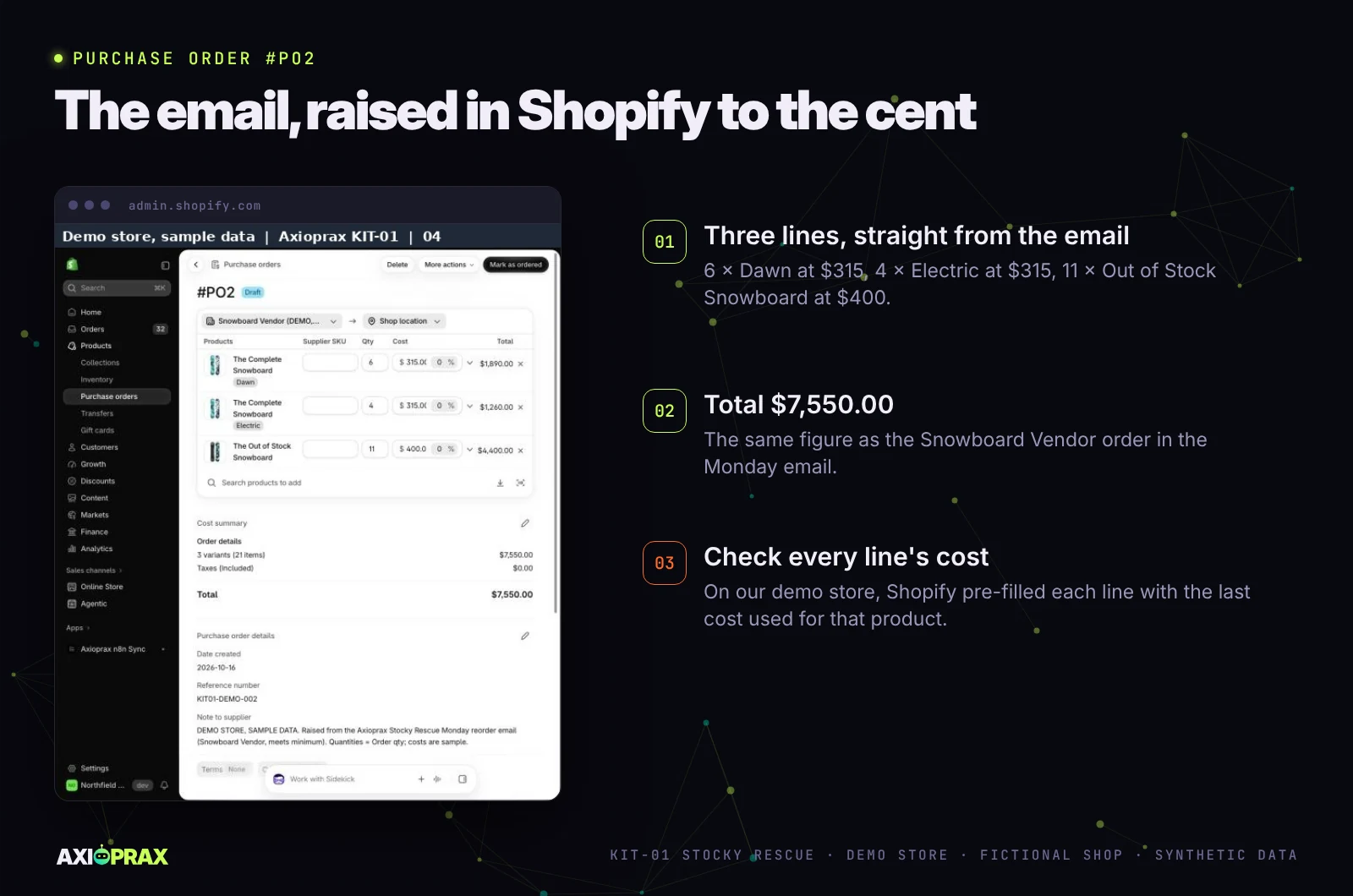
On our demo store, between 16 and 19 October 2026, we raised purchase order #PO2 for $7,550.00, marked it Ordered and received it through transfer #T0002, including one board that arrived late.
Where do suppliers, counts and reports live?
Suppliers are created from the purchase order screen and hold contact details and an address. Payment terms and supplier currency are set on each purchase order, not saved on the supplier, and payments to suppliers happen outside the Shopify admin (Shopify Help Center, managing suppliers).
Stock counts live under Inventory > Stock counts. Staff count, and a manager can review and approve before stock levels change (Shopify Help Center, stock counts).
For demand, the Inventory reports (Analytics > Reports, then filter Category to Inventory) are the closest thing to Stocky's numbers. "Inventory remaining per product" divides stock by average daily sales over the last 28 days, and "Inventory sold daily by product" gives the daily rate itself. ABC analysis grades products by revenue, but stores on Basic or Lite need an app for it. One change to note: from 1 October 2026, inventory reports measure On hand instead of Available, so recent figures can read higher than older ones (Shopify Help Center, inventory reports).
For spending, Shopify added three purchase order reports to Analytics on 6 October 2026: Purchase order costs, which covers ordered items, quantities, supplier costs, estimated taxes and total cost; Purchase order transfers; and Purchases on order (Shopify Changelog).
Does anything in Shopify suggest what to reorder?
Shopify points to Sidekick. Its migration page gives "What should I reorder?" as an example question and says Sidekick recommends items based on sales data and can draft the purchase order for you.
Shopify Flow, Shopify's free automation app, has two relevant templates: "Get notified by email when product variant inventory is low" and "Initiate reorder with vendor when inventory gets low". Both start from the trigger that fires when a variant's inventory changes (Shopify Help Center, Flow trigger). Our guide to Shopify automation workflows covers other routine store jobs.
Our honest limit here: we have not tested Sidekick's reorder suggestions on our demo store, and Sidekick's own help page does not explain how it forecasts, which plans get it, or whether it uses lead times. Check its suggestions against your own lead times before you trust them.
What is still missing compared with Stocky?
Deciding what to order is the missing part. Shopify gives you the documents, but the decision rules Stocky stored (lead times, minimums, shelf limits) have no working home in the admin. Shopify's own migration page lists the gaps:
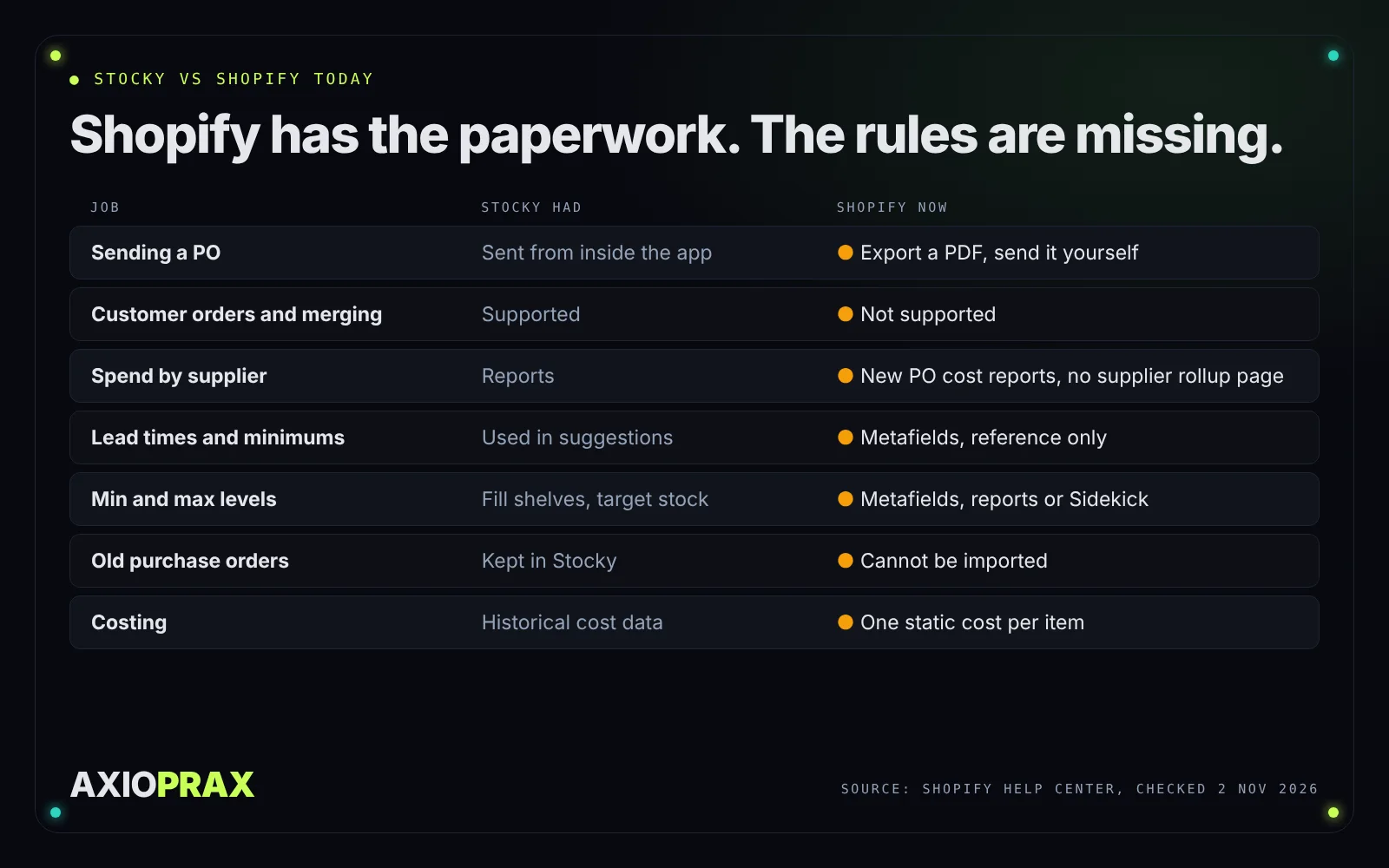
- Sending a PO. Stocky could send it from inside the app. In Shopify you can't email a purchase order from the admin; you export a PDF and send it yourself.
- Customer orders and merging. You can't turn a customer order into a purchase order or merge purchase orders.
- Spend by supplier. Shopify's migration page still says there isn't a dedicated native report for total purchase order spend by supplier. The new Purchase order costs report includes supplier costs, so check whether it gives you the rollup you need before you build one.
- Lead times, minimum orders and case packs. These can live in variant metafields, but they are for reference only and don't feed purchase order calculations.
- Minimum and maximum levels. Shopify suggests custom metafield definitions, reports, or Sidekick.
- Old purchase orders. They can't be imported.
- Costing. Each variant has one static Cost per item; weighted-average or landed cost needs a third-party app.
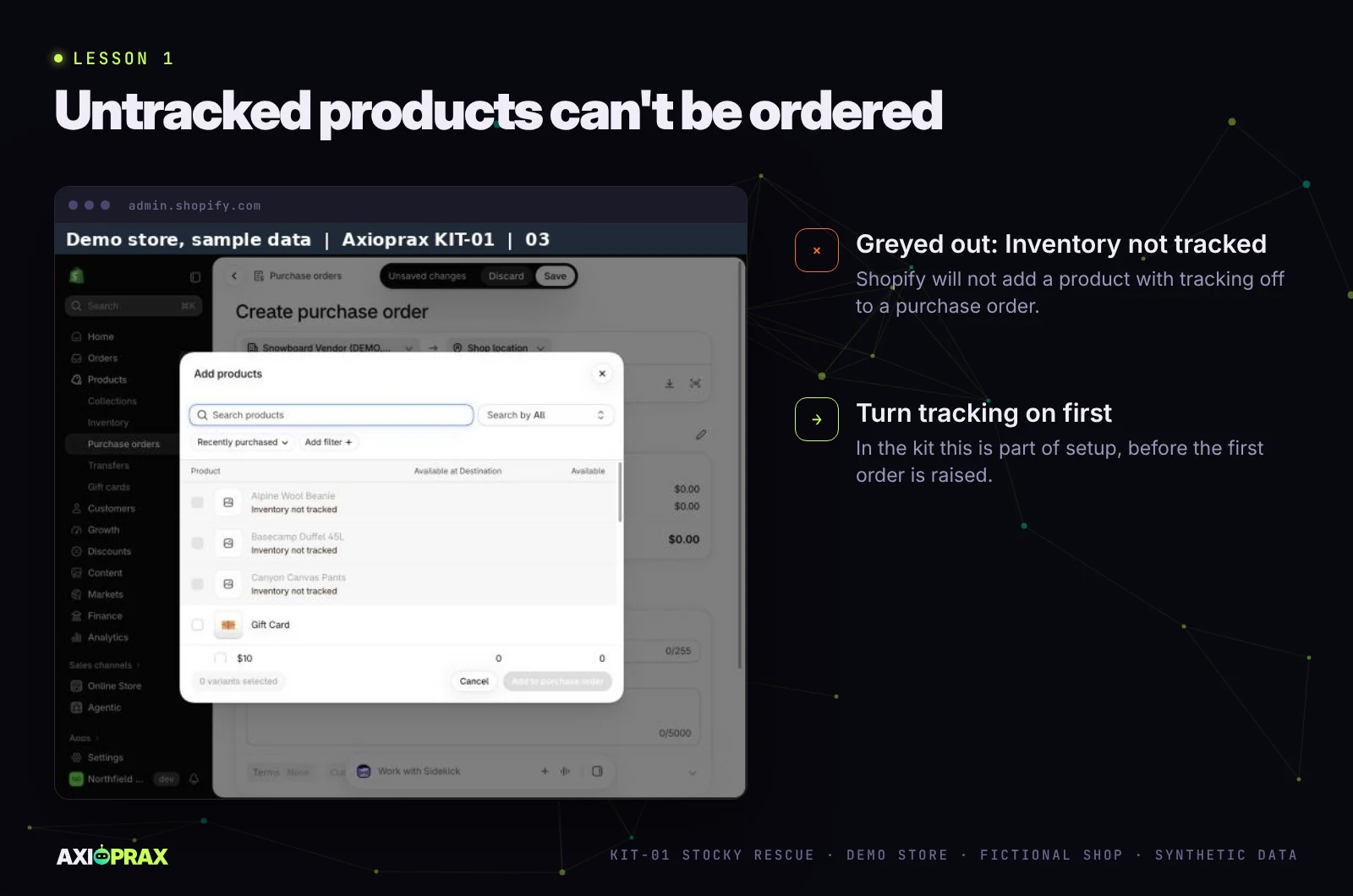
Two more things caught us out on the demo store. Products with inventory tracking off were greyed out and labelled "Inventory not tracked" when we added them to a purchase order, which fits Shopify's instruction to activate tracking before you create one. And the last cost filled itself in: #PO2 opened with $700 per board carried over from an earlier test order, so we retyped every line.
What are the three ways to rebuild reordering?
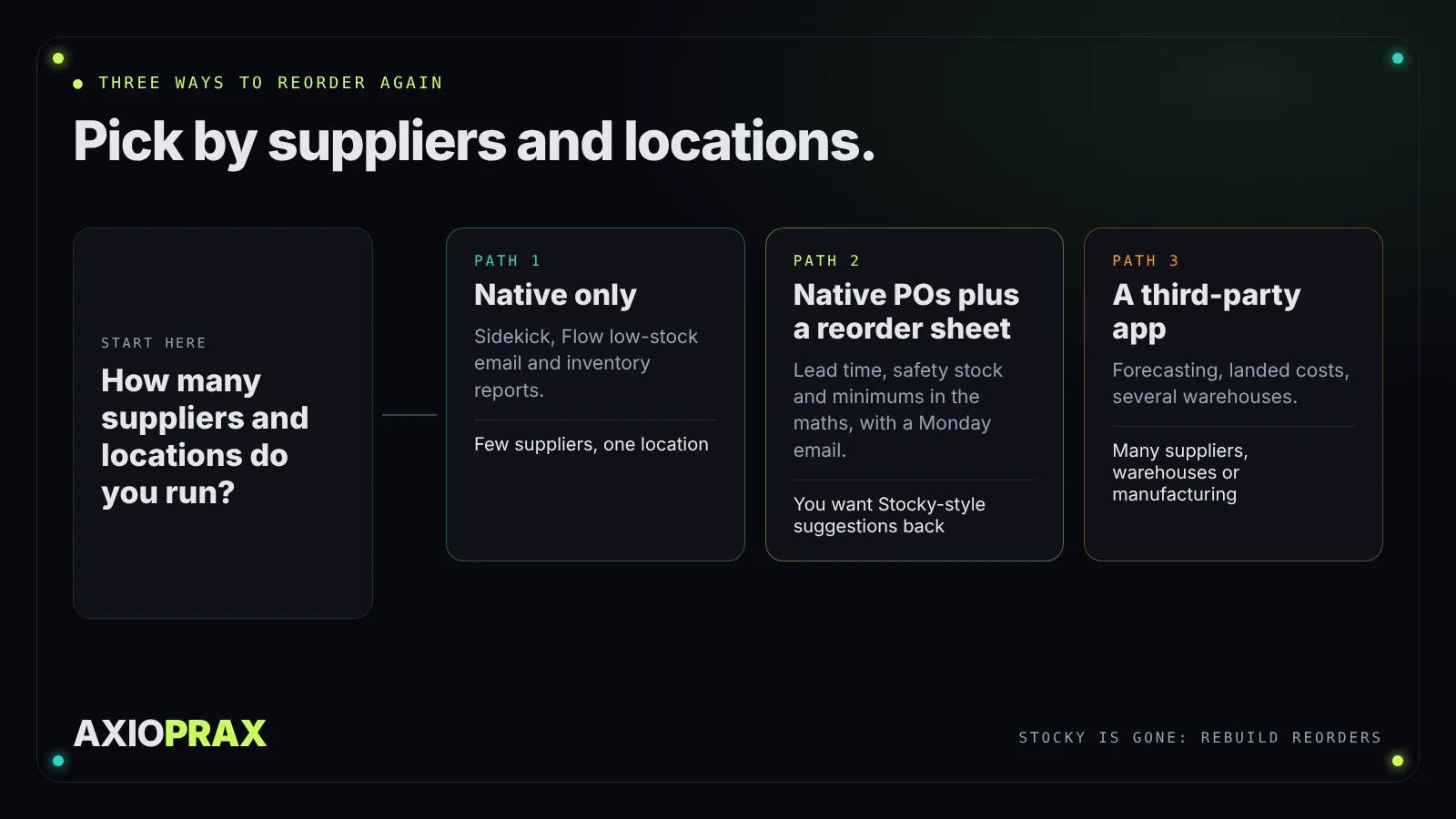
You can stay native, add a reorder sheet to native purchase orders, or move to a third-party app. The right one depends on how many suppliers and locations you run.
Path 1: native only (Sidekick, Flow and reports)
This suits a small catalogue with a handful of suppliers. The steps:
- Turn on inventory tracking for every product you reorder.
- Install the Flow low-stock email template and set your threshold. Our fix page walks through it: get a low stock alert without an app. More inventory fixes sit in the Inventory area of Fixes.
- Each week, open "Inventory remaining per product" and ask Sidekick what to reorder.
- Raise a native purchase order, export the PDF and send it.
The weakness: none of these steps holds a supplier's lead time or minimum order in the maths, and the method lives in one person's head.
Path 2: native purchase orders plus a reorder sheet
This is Stocky's "Last X days" rule with lead time added. In our reorder sheet, each product's reorder point comes from its daily sales, its supplier's lead time and a safety stock. A simple version is average daily sales multiplied by lead time plus safety days. An example with round numbers: a product selling 2 a day, with a 10-day lead time and 4 safety days, has a reorder point of 28. At or below 28 in stock, it goes on this week's order.
This is what our Stocky Replacement kit does. Your suppliers go into Shopify's own purchase orders, a supplier sheet keeps what Shopify doesn't hold (lead times, minimum orders and payment terms), a reorder sheet and a Monday email decide what to order, and your first stock count runs in Shopify. On our demo store, the reorder sheet first held 10 of 18 products out of the order for missing, duplicate or absent sales data. Once we filled the gaps, the products marked ORDER NOW went from 2 to 4, and the Monday email's $7,550 order to one supplier matched purchase order #PO2 to the cent. The full build, including the test rounds it failed, is in our demo build write-up.
The weakness: it is a weekly step, it has no seasonality, and a sheet needs an owner. On the demo store the Monday email has run once by hand from a real Google account; a run on its weekly schedule is not yet proven.
Path 3: a third-party app
This suits several warehouses, landed costs, manufacturing or many suppliers. Shopify itself points to third-party inventory apps for landed costs and bin-level moves. Some App Store listings, in their own words, with no ranking from us and no testing by us:
- EZstock: "See what to reorder and when, email purchase orders... Leaving Stocky? Upload your export."
- Binly: "Stocky is gone. Binly replaces it" with "phone barcode stocktakes, purchase orders, smart reorder".
- Stockcast: "Purchase orders by supplier and Stocky CSV import."
- Prediko: "Demand forecasting, inventory transfers, raw materials, manage purchase orders & reports."
- Inventory Planner by Sage: "Forecast demand, optimize inventory & streamline purchases".
- Stockroom by MyWorks: "Purchase orders, inventory, manufacturing with BOMs, and QuickBooks sync".
Several of these pitch themselves as Stocky replacements, so check each listing's launch date and review history before you commit. Ask each one two questions: does it import a Stocky purchase order export, and how far back does it read your orders?
How do you choose the right path for your store?
Pick by supplier count, locations and how much of Stocky's logic you used.
- Few suppliers, one location, and you mostly reorder from memory: Path 1. Write each supplier's lead time down anyway.
- You liked Stocky's suggestions and want them back with lead times and minimums: Path 2.
- Several warehouses, landed costs, manufacturing or dozens of suppliers: Path 3.
Whatever you pick, two rules hold. Shopify only treats an item as out of stock when inventory is tracked, and untracked products would not go on our purchase orders, so switch tracking on first. And don't let the app decision delay the export.
What should you do this week?
Get the data out first, then decide.
- Export completed purchase order reports, stocktake history and historical cost data from Stocky before about 29 November 2026.
- Screenshot every supplier record.
- Write each supplier's lead time, minimum order and payment terms on one page.
- Raise your next order as a native Shopify purchase order and receive it through its transfer.
If you want the Monday routine rebuilt for you, see the Stocky Replacement kit, then describe your store.