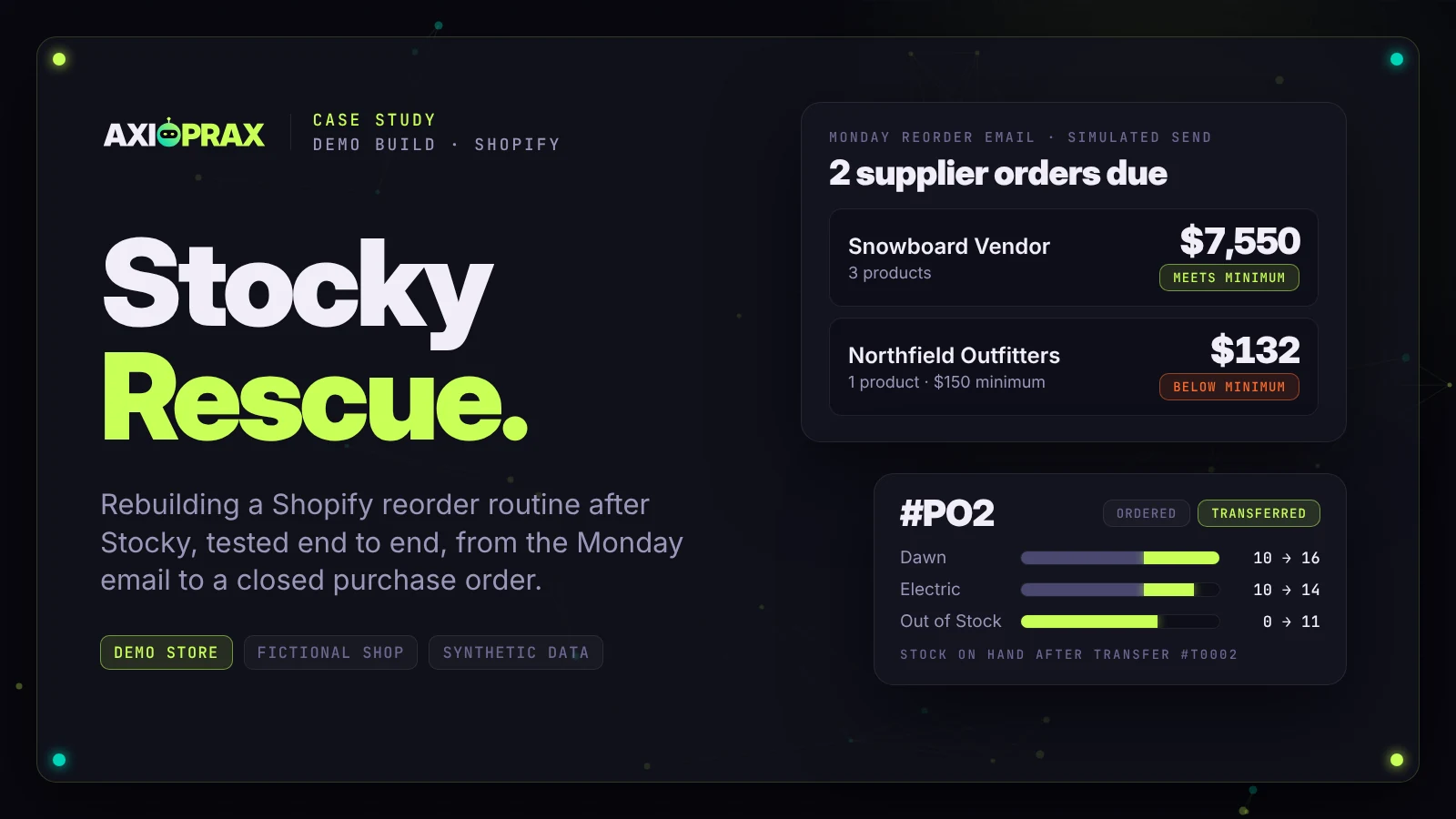
Shopify says Stocky is no longer available as of 31 August 2026, and stores have at least 90 days after that to export their data. Suppliers can't be exported and old purchase orders can't be imported, so the reorder routine has to be rebuilt. This is how we rebuilt it, with a supplier sheet, a reorder sheet, a Monday email, an invoices tab, a stocktake tab and Shopify's own purchase orders, on our own demo store. It is for merchants who used Stocky for purchase orders, suppliers or stocktakes. Our kit, KIT-01 Stocky Rescue, went through several rounds of testing by a separate tester who had not seen the build, and the rounds it failed are listed below.
What the kit includes and its price are on the KIT-01 Stocky Rescue page. If your Stocky export screens still open, our free Stocky export checklist lists what to export, screenshot and write down first. It is a one-page PDF and needs no email.
This is a demo build, not a client project. Everything below was built and tested on Northfield Outfitters, our own Shopify development store: demo store, fictional shop, synthetic data, real tools. There are no client results in this article.
Key points
- Shopify says Stocky is no longer available as of 31 August 2026, with read-only export access for at least 90 days after that date (Shopify Help Center, transitioning from Stocky, checked 20 October 2026).
- Suppliers can't be exported from Stocky, and historical Stocky purchase orders can't be imported into Shopify (same page).
- Stock on a Shopify purchase order is received through an inventory transfer created from the order once it is marked Ordered (Shopify Help Center, purchase orders).
- On our demo store, with synthetic data, the Monday email's $7,550 supplier order matched Shopify purchase order #PO2 exactly.
What happens to my Stocky data?
Stocky is no longer available. You can still export your data, but only for a while. Stocky is no longer available as of August 31, 2026.
Merchants have read-only access to export your data for at least 90 days after that date
(Shopify Help Center, transitioning from Stocky). The page gives no end date, so the window closes no earlier than about 29 November 2026, and it may stay open longer.
The same page has two lines that shape most of the work. Suppliers can't be exported from Stocky.
Historical purchase orders can't be imported into Shopify either. So the supplier list gets rebuilt by hand, and old orders live in an archive you keep.
On the Shopify Community, merchants have listed what went with it: purchase order export, stocktakes, marking invoices paid or unpaid, and invoice due dates (reported by merchants in Shopify Community thread 639203, read October 2026). As another merchant put it, The hard part is getting your history out in one piece
(Shopify Community thread 651074, read October 2026).
Why can a Shopify app only see 60 days of orders?
Standard app access (read_orders) reaches back only 60 days. Older orders need read_all_orders, which Shopify has to approve (shopify.dev, access scopes). The kit avoids this by using Shopify's own sales report export instead of an app, so the reorder sheet can work from 90 days of sales. On our demo store that report had no usable product history, so we used synthetic sales (see below).
What does the Stocky Rescue kit include?
Eight parts that bring back the weekly reorder routine, plus the invoice tracking and stocktakes that merchants said they lost. The rest of Stocky's features are out of scope.
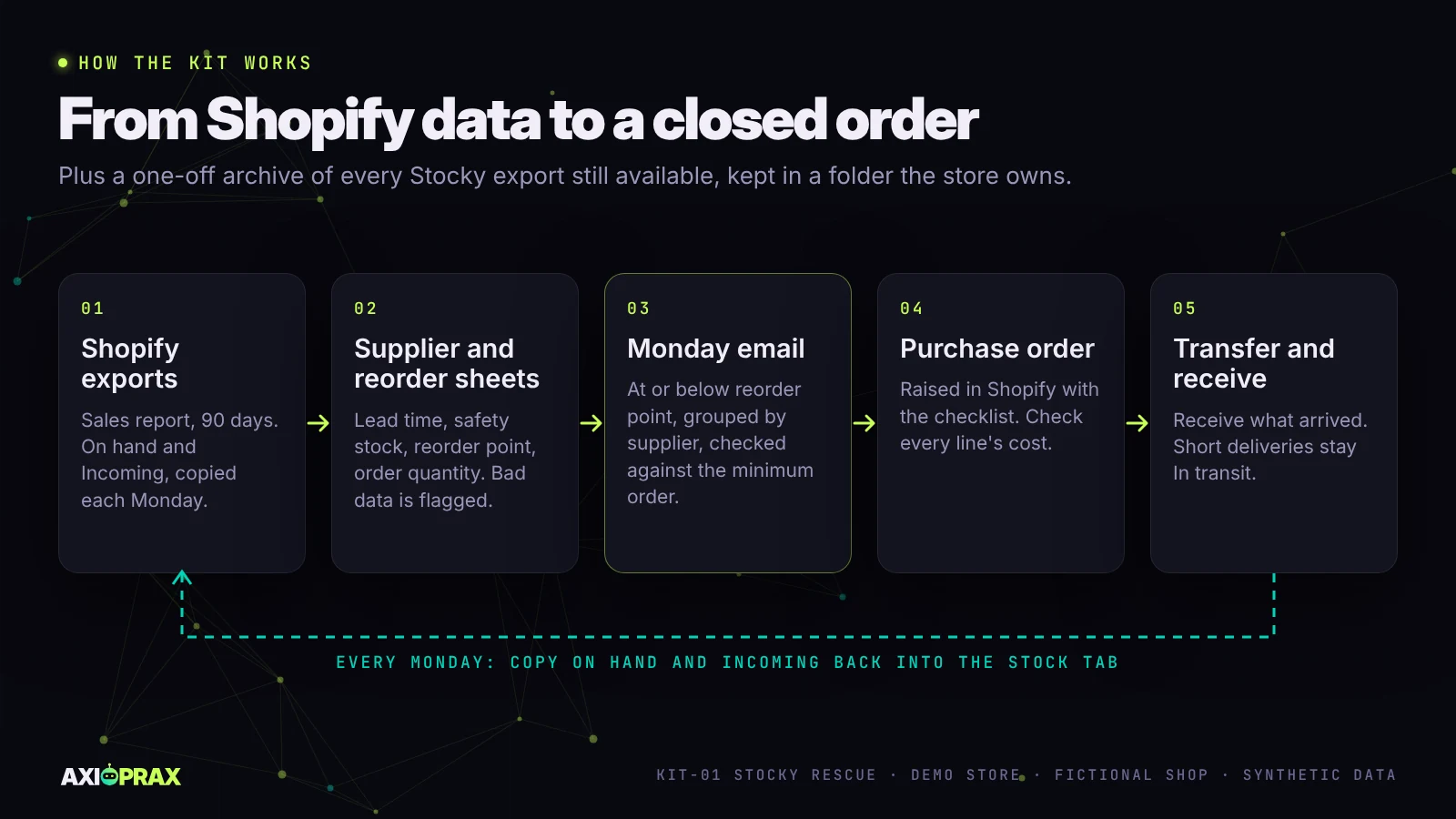
- Export archive. Every Stocky report still on offer, saved to a dated folder the store owns, with screenshots of supplier records that can't be exported. Shopify's Help page names completed purchase order reports as CSV files, stocktake history and historical cost data; we also take any other report the store's Stocky screens still offer.
- Supplier sheet in Google Sheets or Excel, with contacts, lead times, minimum orders, payment terms and products supplied, rebuilt from the archive and a short interview with whoever used Stocky.
- Reorder sheet. One row per product with daily sales, stock, lead time, safety stock, reorder point and suggested quantity, plus an ORDER NOW flag. Rows with doubtful data are flagged and kept out of the order. Each Monday someone copies On hand and Incoming from Shopify into it, unless the store takes the Auto stock sync add-on (see below).
- Monday reorder email. Products at or below their reorder point, grouped by supplier and checked against each minimum, with a short section on supplier invoices that are overdue or due in the next 7 days. It is set up as a weekly Google Sheets (Apps Script) email that runs from the store's own Google account. It has been run by hand from a real Google account on the demo workbook (19 October 2026), and the email arrived. A run on its weekly schedule is not yet proven. We have not built a Shopify Flow version.
- Invoices tab. One line per supplier invoice: PO number, invoice number, date, amount, due date, Paid or Unpaid, and an overdue flag. Leave the due date blank and the sheet works it out from the supplier's payment terms. Open invoices are entered with you from your own records; Stocky's invoice history stays in the archive rather than being typed in again.
- Stocktake tab. One line per product with what the Stock tab expects, what you counted, the difference and its value at cost, marked MATCH, OVER, SHORT or NOT COUNTED. It never changes Shopify: you review the count, then adjust stock in Shopify yourself.
- Purchase order checklist for raising, sending, receiving and closing a Shopify native purchase order, with screenshots from the store's own admin.
- Handover. A recorded walkthrough and a one-page "how this works / what to do if" note.
On a real store the archive comes first, because it can't be redone once the export screens close.
There is one optional extra. The Auto stock sync add-on, at $149, copies On hand and Incoming from Shopify into the Stock tab early every Monday, before the email runs, so nobody has to do it by hand. We have built it as a Google Apps Script that runs in your own sheet, with an n8n workflow as a second option for stores that already use n8n. It only reads Shopify, and if anything looks wrong it writes nothing and says why. It is still in testing: so far it has run only against a simulated Shopify and Google Sheets, not a real store, so we don't offer it yet.
What did we build it on?
Northfield Outfitters, a fictional shop on a Shopify Plus development store of ours. It has never had Stocky, so we made up the supplier and sales data a Stocky store would have had.
Of its 26 products, 25 had no SKU, so the sheets match on product and variant name. Its 32 orders had come in through our own n8n sync as custom line items, and Shopify's units sold report filed all 36 units under a product called "None". Shopify also stores a supplier only as a vendor name.
So the demo uses the store's 18 tracked variants and their real on-hand stock, read on 16 October 2026, with synthetic sales and details for 4 suppliers over 90 days. Two snowboards with stock sat in Draft and Archived, so we left them out, and the kit now takes active products only. We also planted five gaps on purpose: a product with no supplier, a supplier with no lead time, a supplier with no email, a duplicate sales line and a product with no sales line.
Why is the order in this article #PO2?
Because we threw away our first run. Our first sample data had one board selling 450 units in 90 days and costs at full retail price, so the Monday email asked for $122,035 across two suppliers. We had already raised one of those orders in Shopify as #PO1, for $54,535, and received all but two units.
The formulas were right, but no small shop sells boards in those numbers, so a demo built on them would have proved very little. We rebuilt the sales at small-store levels (2 to 40 boards per product over 90 days, 72 for the best-selling wax), set costs at about 45% of retail and gave one supplier a $150 minimum. In Shopify we rejected the two outstanding units, reset on hand for the three boards to 10, 10 and 0, raised #PO2 and archived #PO1, which hides an order without deleting it.
What did the reorder sheet catch?
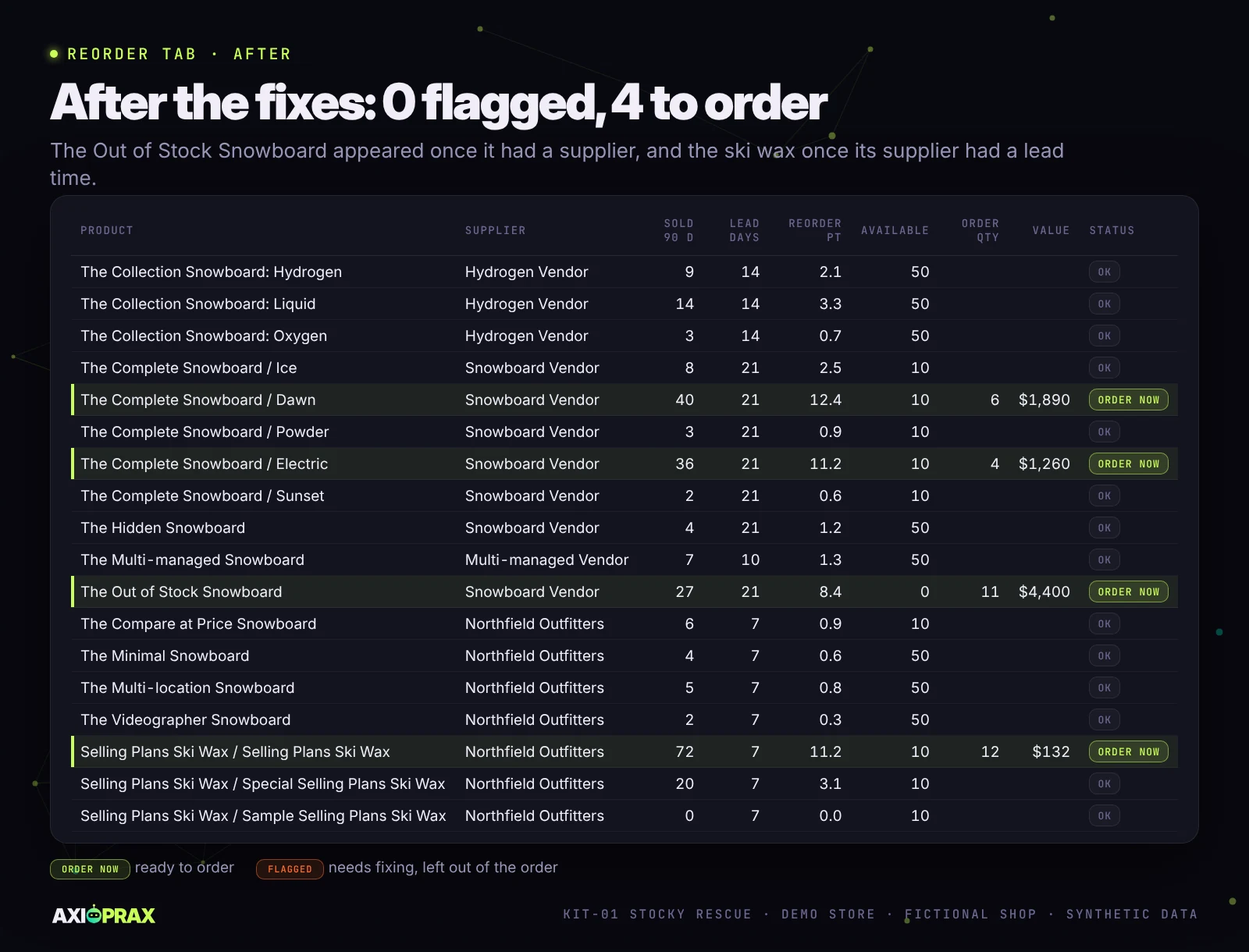
All five planted gaps. Four of them held 10 products out of the order, and the fifth, a supplier with no email, was listed separately. Eight products showed MISSING DATA, one CHECK DUPLICATE and one NO SALES DATA, which left only 2 at ORDER NOW.
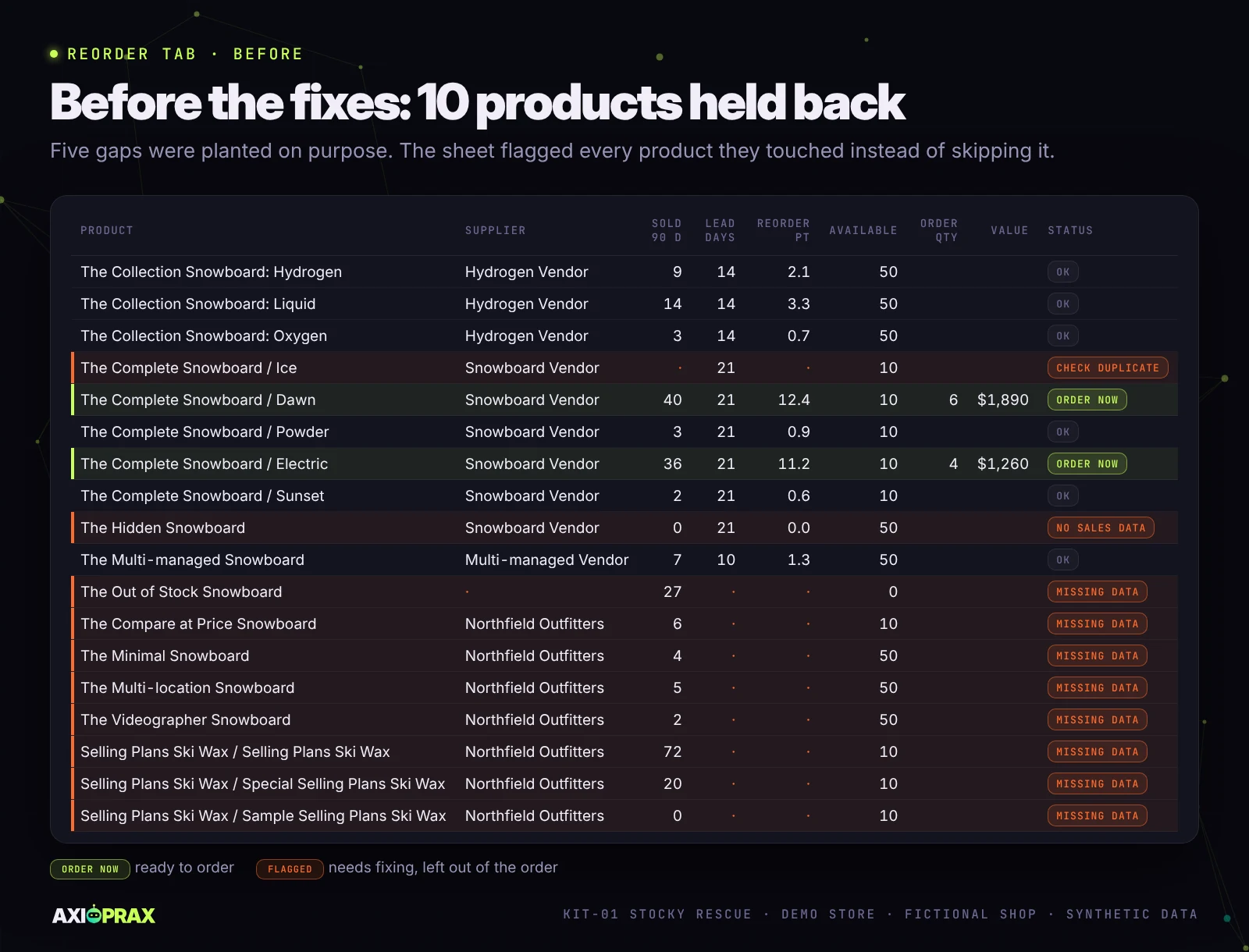
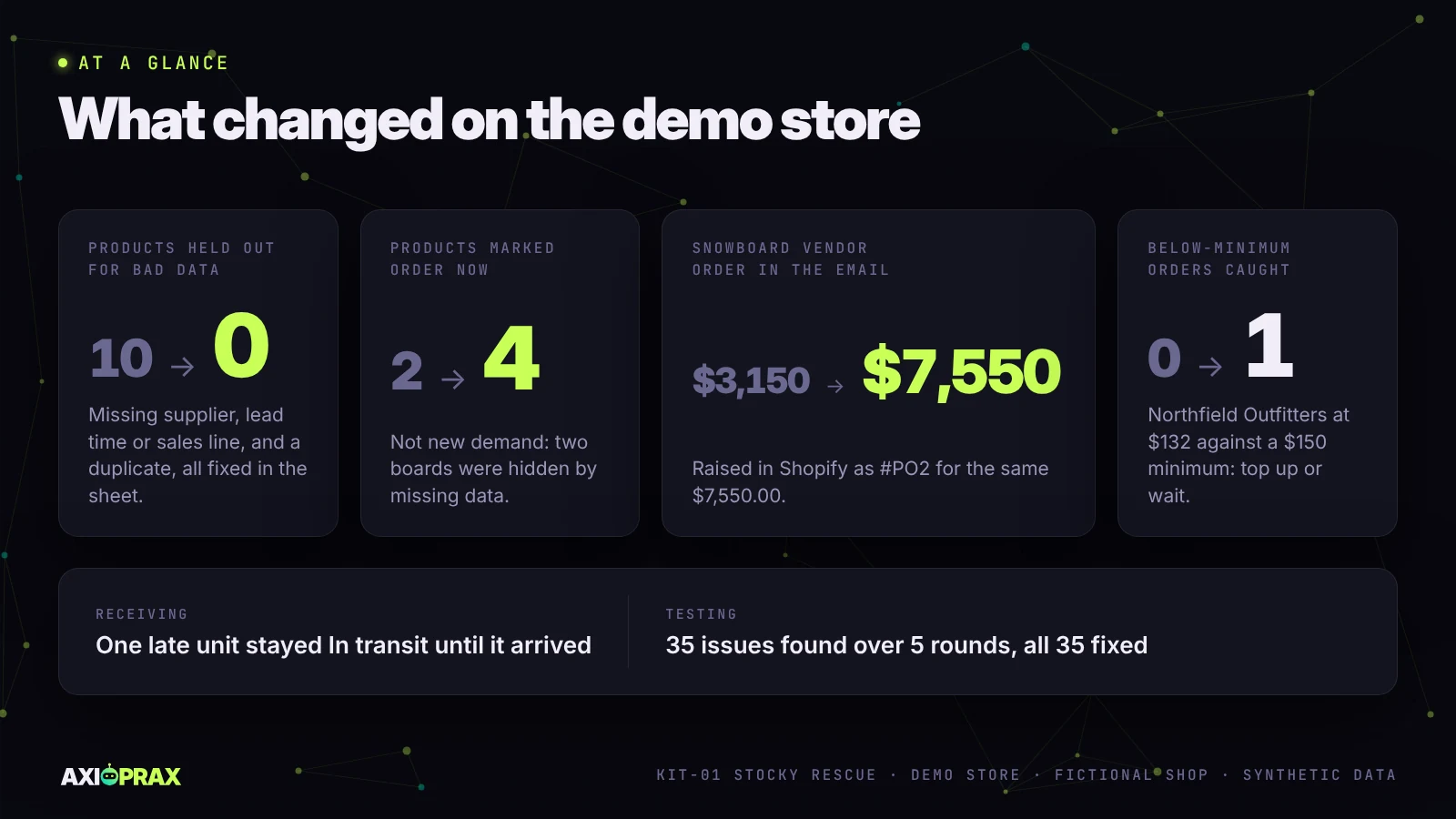
Once we filled the gaps, flags dropped to 0 and ORDER NOW rose to 4. Sales hadn't changed. The Out of Stock Snowboard joined the order once it had a supplier, and the ski wax once its supplier had a lead time. The missing data had been hiding two orders that were already due.
What does the Monday email say?
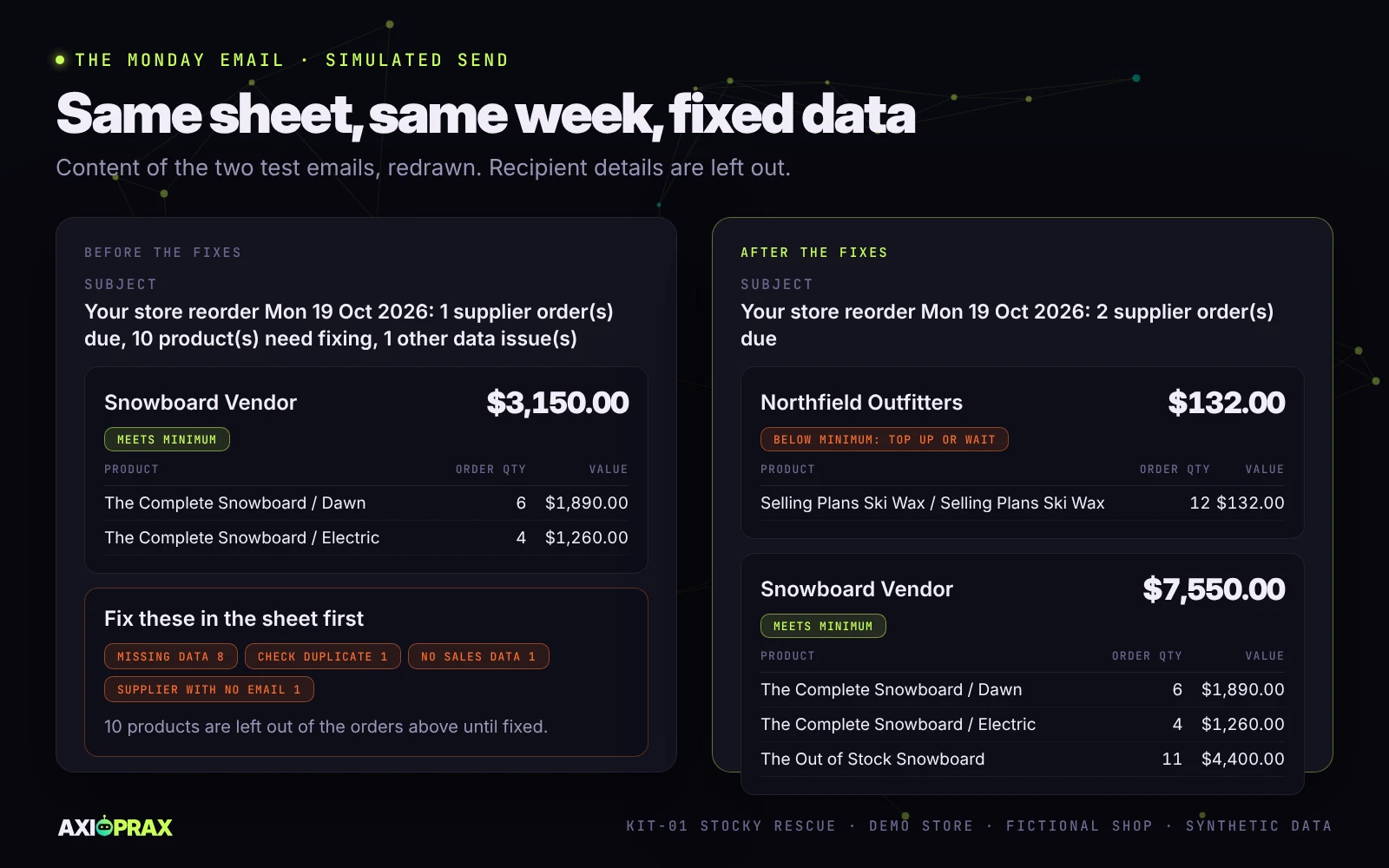
What to order from each supplier this week and whether each order clears its minimum, with data fixes listed separately.
Before the fixes it showed one order, Snowboard Vendor at $3,150, with 10 products to fix and 1 supplier with no email. Afterwards Snowboard Vendor came to $7,550, which meets its minimum. Our second sample supplier, which we had named Northfield Outfitters after the store, came to $132 of wax. That is under its $150 minimum, so the email says to top up or wait.
Has the email run from a real Google account?
Yes, once, by hand. On 19 October 2026 we ran the Monday email from a real Google account on the demo workbook, and it arrived with the right figures: two supplier orders (Snowboard Vendor at $7,550, meeting its minimum, and Northfield Outfitters at $132, below it) and one overdue invoice. The first attempt failed, because the script was not attached to the sheet, and the failure alert email arrived, which is what it is for. That run was started by hand; a run on the weekly schedule is not yet proven.
If you only need a simple low stock alert, our list of n8n e-commerce automation workflows covers that smaller job, and our guide to Shopify automation workflows covers other routine store tasks.
Did the purchase order match the email?
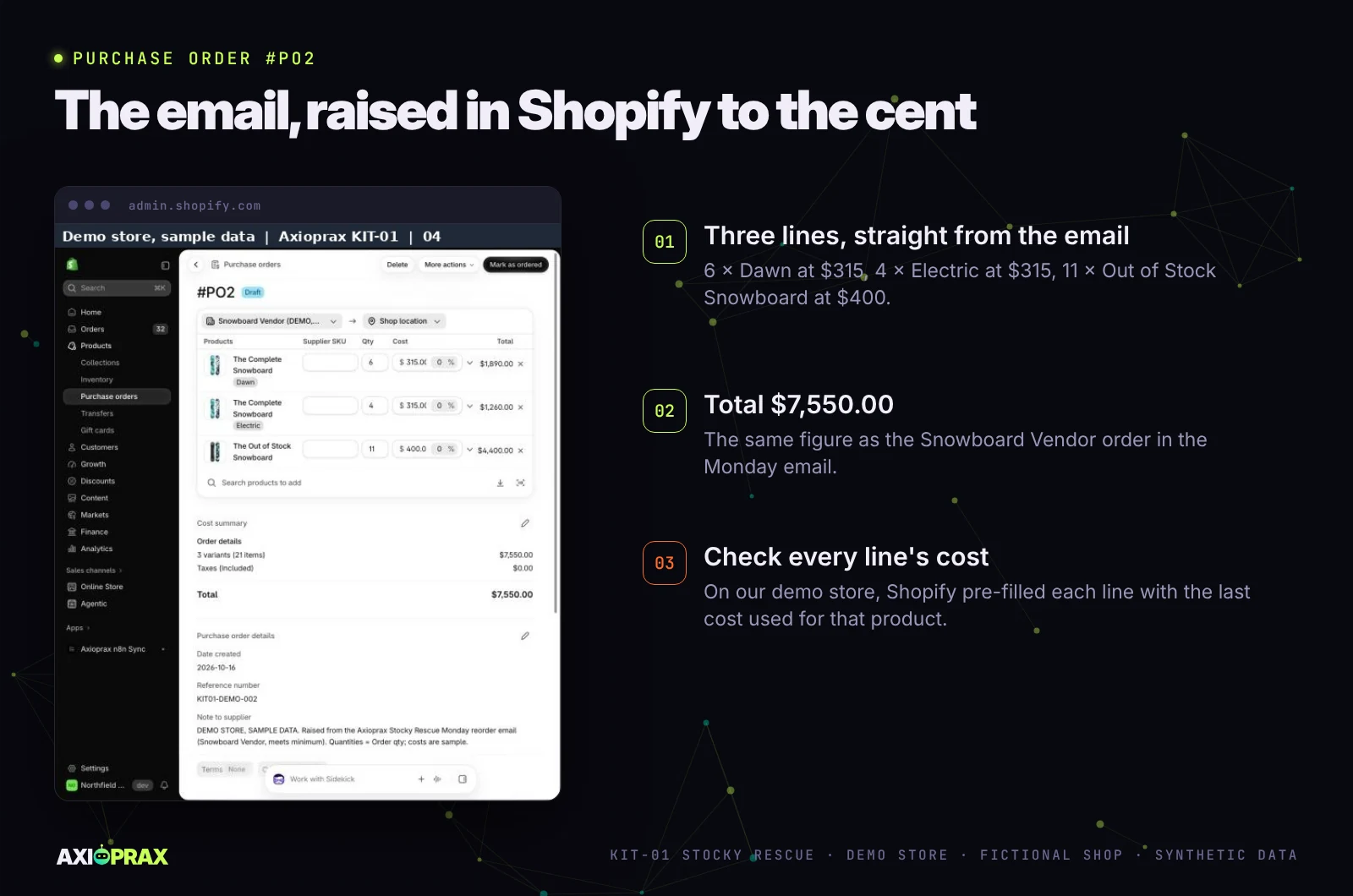
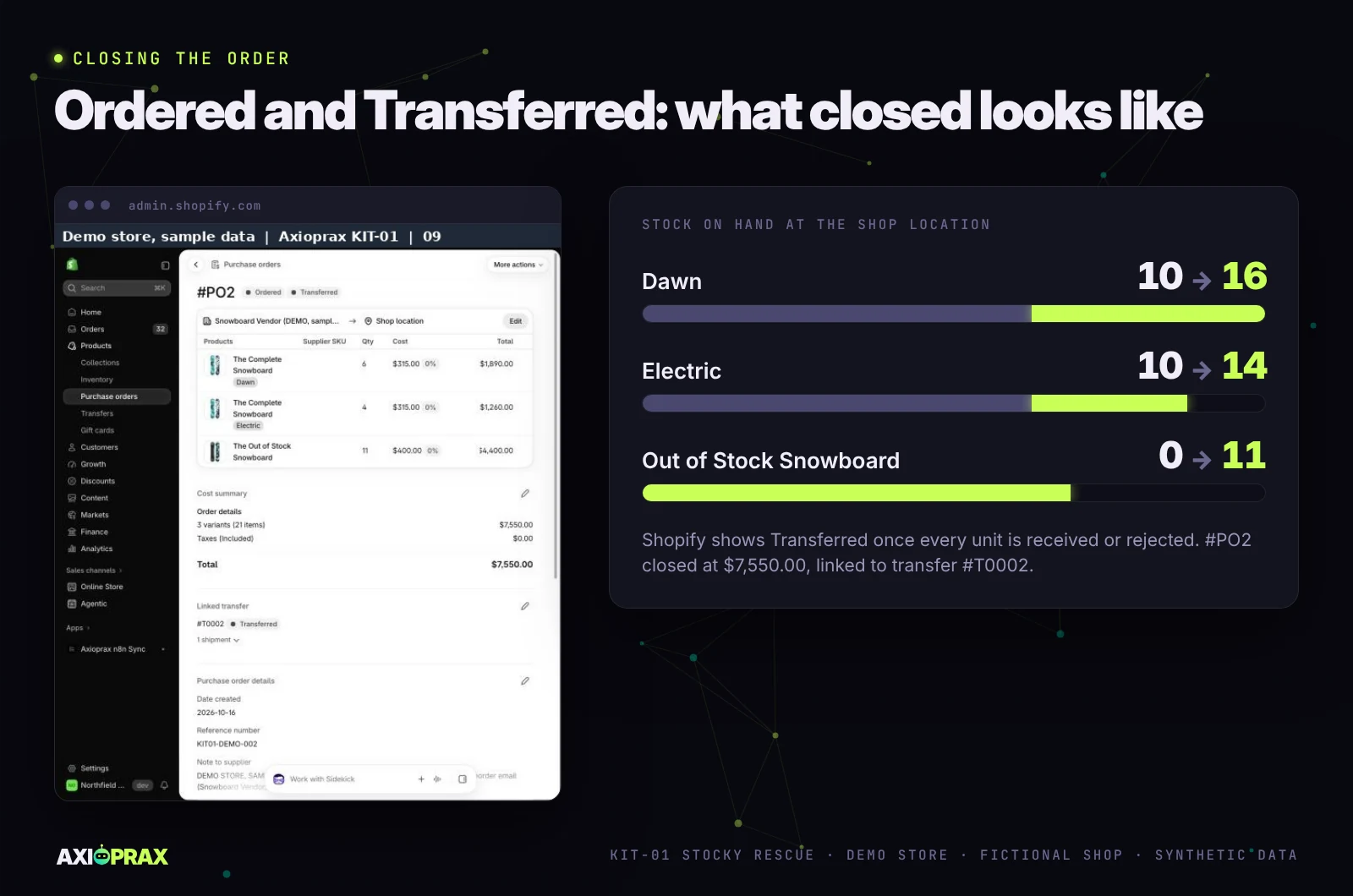
Yes, to the cent. We raised #PO2 to Snowboard Vendor for 6 x Dawn at $315, 4 x Electric at $315 and 11 x Out of Stock Snowboard at $400, a total of $7,550.00, then marked it Ordered.
How do you receive stock on a Shopify purchase order?
You create an inventory transfer from the purchase order once it is marked Ordered, then receive against the transfer. You don't receive on the purchase order itself (Shopify Help Center, purchase orders).
Our first checklist got this wrong, pointing to a Receive inventory button that appeared nowhere in our screenshots, and our tester failed it. The rewrite follows what we clicked on the demo store: Create transfer, Mark as in transit, then Receive items.
What happens to a short delivery on a Shopify purchase order?
Shopify keeps the missing units In transit on the same transfer and shows them as Incoming, so the shortfall stays visible. We received 6 of 6, 3 of 4 and 11 of 11, as if one Electric board was late. Electric on hand went from 10 to 13, and the fourth board stayed In transit until we received it, when on hand reached 14.
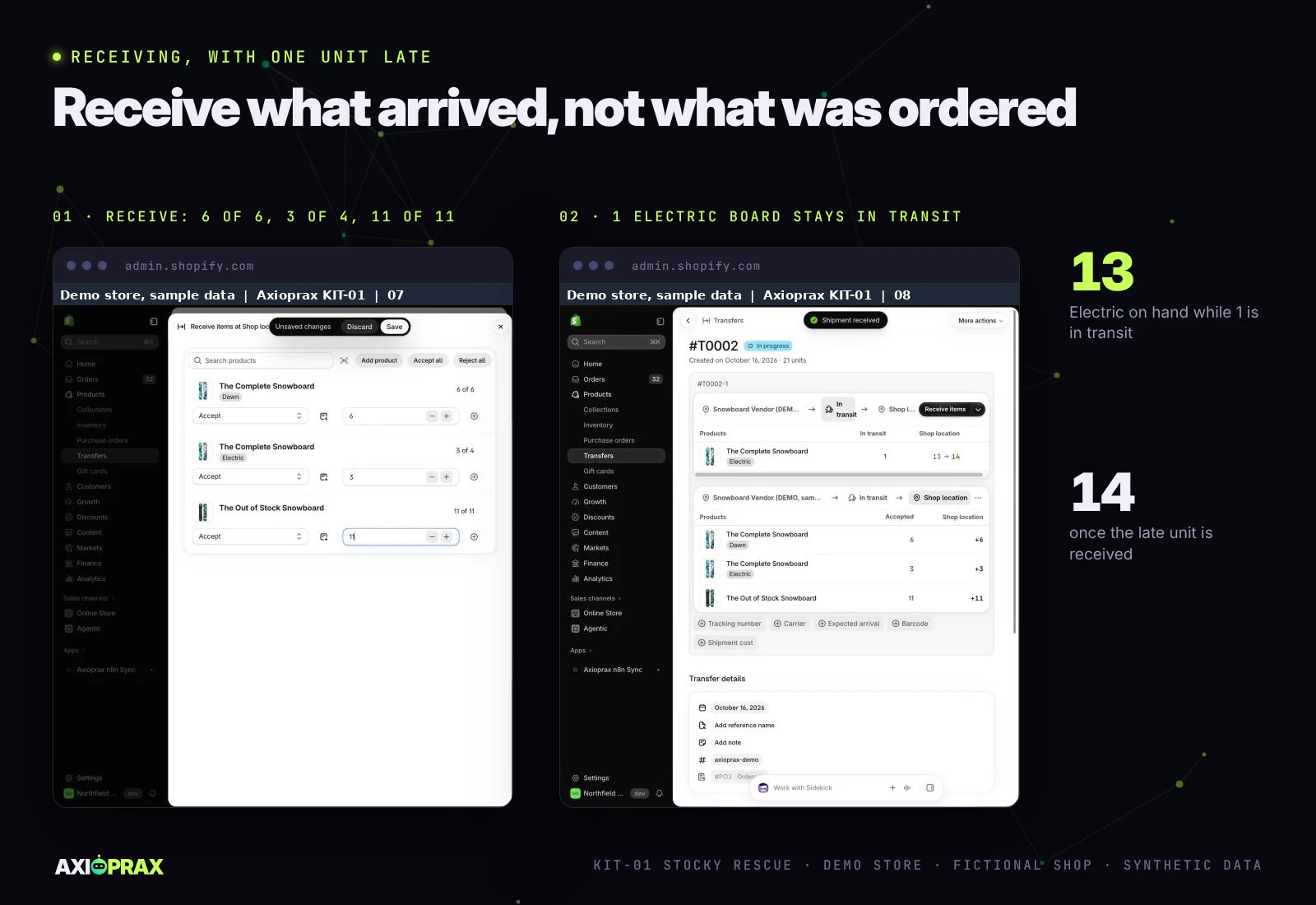
Type what turned up on each line, and use Accept all only when every unit is there. If the rest will never come, reject those units so they stop counting as Incoming.
When is a Shopify purchase order closed?
When every unit has been received or rejected. Shopify then shows the order as Transferred, which is as closed as it gets. Once the late board was in, #PO2 read Ordered and Transferred.
What caught us out in Shopify's purchase orders?
Three behaviours we had not expected now have their own lines in the checklist.
Untracked products are greyed out
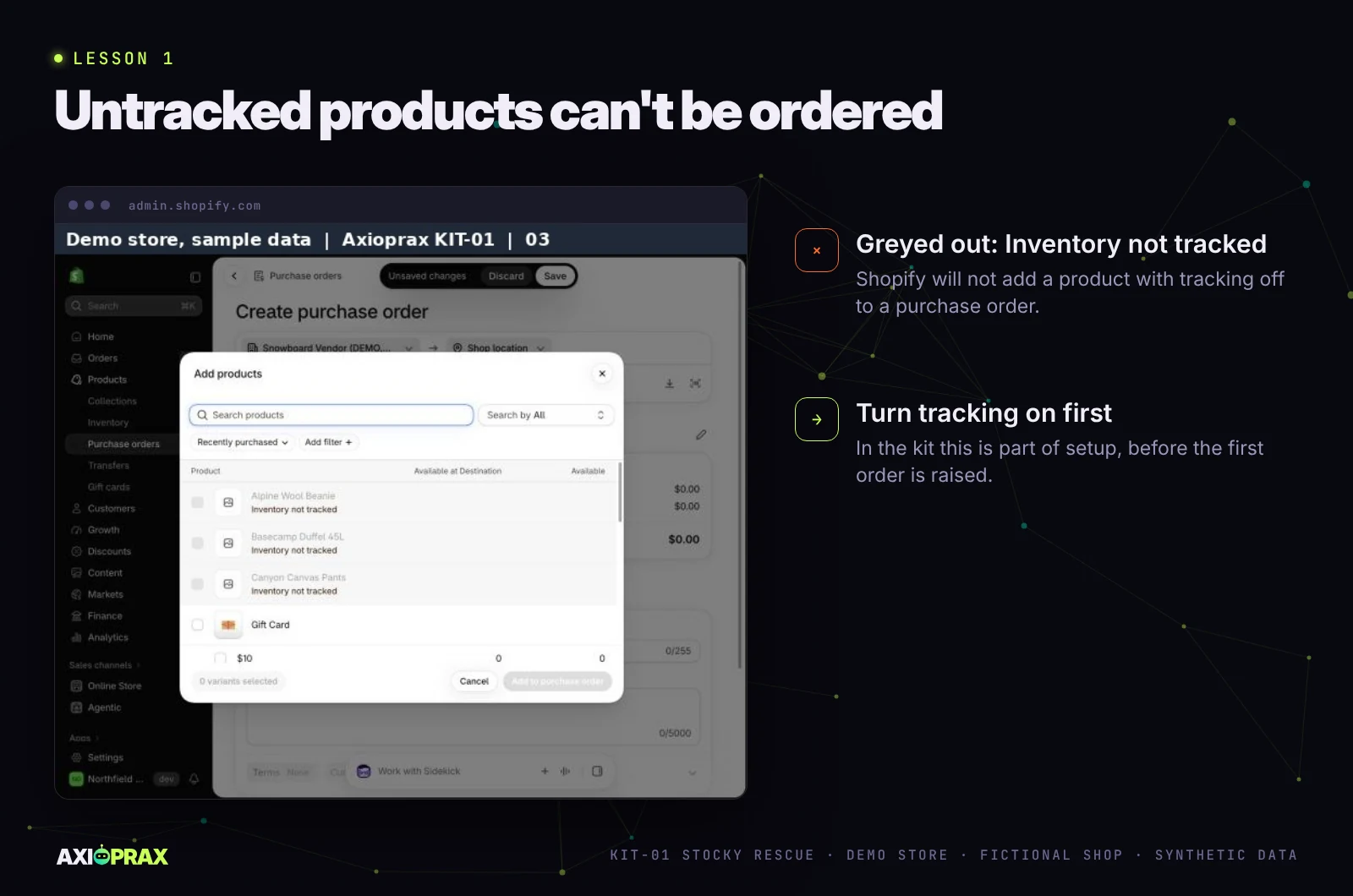
When we added products to our first order, some were greyed out and labelled "Inventory not tracked". During setup we switch tracking on for anything you reorder, before the first order goes in.
The last cost comes back on its own
This one nearly put the bad data back. When we opened #PO2, Shopify had pre-filled each line with the last cost used for that product, which was $700 from our first run's #PO1. We retyped every line. When prices move, the pre-fill carries the old one forward, so check each line against the supplier's current price before marking the order Ordered.
Sending and paying are on you
Shopify does not send the purchase order to your supplier, so you send it by their usual route. Its purchase orders don't track whether an invoice is paid either, which is one of the things merchants said they lost with Stocky. So the checklist has you add each invoice to the Invoices tab when it arrives and mark it Paid when you pay it, and the Monday email reminds you about anything overdue.
How hard did we try to break it?
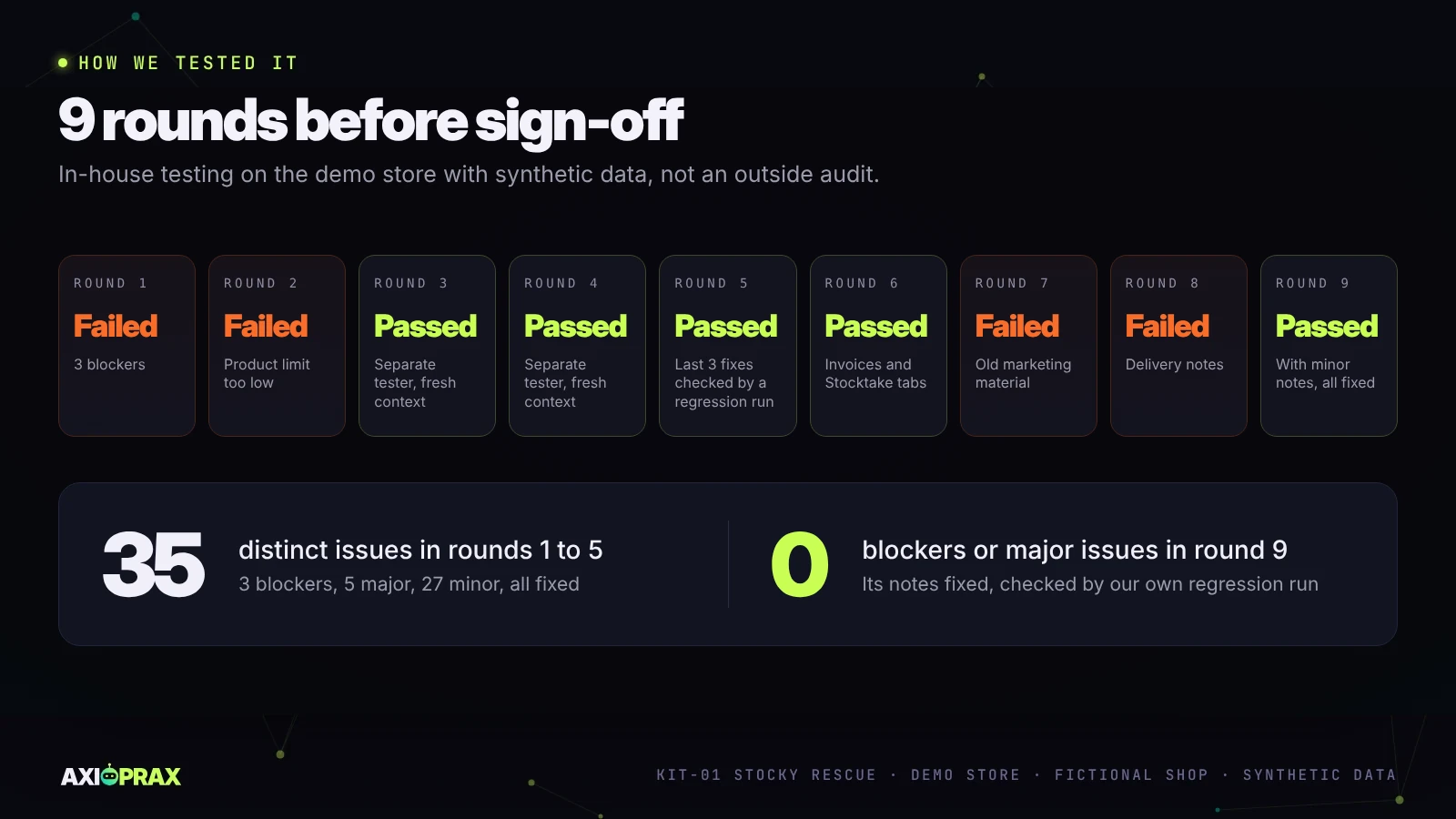
We ran five rounds with a separate tester working from a fresh copy, who had not seen the build or its logs. The kit failed the first two.
Round 1 found 3 blockers: typing "10 units" into an on-hand cell made that board vanish from the email without warning, a product entered twice in the Stock tab was ordered twice, and a formula range stopped at row 19, so a product added below it was never ordered. Round 2 found that the workbook covered 500 products while we offered the kit to stores with up to 1,500. Smaller finds included a name starting with "#" read as a spreadsheet error, and the question mark in "Wax?" acting as a wildcard.
Across the five rounds the tester logged 35 distinct issues (3 blockers, 5 major, 27 minor; an issue found again in a later round is counted once), and we fixed all of them. Rounds 3, 4 and 5 passed. The last 3 fixes were checked only by our own 17-case regression run.
When we added the Invoices and Stocktake tabs, a separate tester who had not seen the build ran a sixth round on them. It passed, with 13 minor issues: an invoice whose supplier was typed in lower case was overdue in the sheet but missing from the email's overdue list, a credit note showed as overdue, and a count of minus five was accepted as SHORT, among others. We fixed all 13.
A seventh round retested those fixes, and all 13 held. It found 10 more minor issues in the kit, and it failed the round on our marketing material: an older set of posts and videos, written before the kit grew, still carried wording we no longer use. We marked those files superseded. An eighth round failed too: our internal delivery notes still pointed at the first version of the workbook, and there was no blank copy ready for a client, so a client could have been handed the wrong file. It also found smaller issues, such as a supplier name containing * or ? being read as a wildcard. We fixed all of them. A ninth round retested those fixes and passed, with minor notes: for example, the delivery notes did not say plainly that a store with two locations must add both locations' stock together, or that the client, not us, should set up the weekly email schedule from their own Google account. We fixed those notes too; the fixes from the ninth round have so far been checked only by our own regression run. All of this was in-house testing on the demo store with synthetic data. Nobody outside has audited it.
On a real store, you sign off against eight acceptance tests, from checking the archive to raising and receiving one test purchase order with the checklist alone, plus one overdue test invoice and one stocktake line that is deliberately out.
What the kit does not do
- It isn't an ERP or a full inventory app. If you need landed costs, manufacturing or multi-warehouse transfers, an inventory app is the better fit, and we will tell you so.
- Forecasting is a simple sales-rate reorder point, with no seasonality.
- We don't set up a paid inventory app for you, and catalogue clean-up goes only as far as the sheets need.
- On its own it does not read stock from Shopify. Skip the Monday copy and an order already placed is suggested again. The Auto stock sync add-on is built to do that copy, but it is still in testing.
- Stock is one figure per product across up to 2 locations. Reorder points per location are custom work.
- The Stocktake tab doesn't change stock in Shopify. You make the adjustment yourself after review.
Is the kit a fit for your store?
- You used Stocky for purchase orders, suppliers or stocktakes.
- The Stocky export screens still open in your admin (if not, see the FAQ below).
- You have up to 2 locations, up to 1,500 active products and up to 40 suppliers. Bigger stores get a custom quote.
- The products you reorder are active, with inventory tracking on or ready to switch on.
We work through a Shopify staff account with the right permissions, never an owner login, and no passwords by email. The kit is $349. If your store upgrades to Inventory Intelligence ($750) within 60 days, the $349 you paid for Stocky Rescue counts towards it.
Getting started
If your store used Stocky and you want the Monday reorder routine back, with a Google Sheet, a Monday email and Shopify's own purchase orders, see what is in the KIT-01 Stocky Rescue kit, then describe your store at axioprax.com/start. Tell us roughly how many products, suppliers and locations you have, and whether the export screens still open. We confirm eligibility before you pay.
Frequently asked questions
What replaces Stocky?
For most small stores, Shopify's own purchase orders plus a reorder routine. Shopify has native purchase orders and transfers, but they don't suggest what to reorder. Our kit replaces the reorder routine with a supplier sheet, a reorder sheet and a Monday email. If you need landed costs, multiple warehouses or demand forecasting, a full inventory app is the better fit.
The Stocky export window has closed for my store. Can you still help?
Partly. With the export screens gone there is no archive to take, but we can rebuild the supplier and reorder sheets from scratch at the same price, confirmed in writing before you pay.
Can I import my old Stocky purchase orders into Shopify?
No. Shopify does not support importing historical purchase orders, so they are kept as exported files in your own archive folder.
Do my products need SKUs?
No. The sheets match on product and variant name instead, as they did on our demo store. The handover note still recommends adding SKUs.
Do I need Shopify Flow or a particular Shopify plan?
You don't need Shopify Flow: the Monday email runs from Google Sheets, and we have not built a Flow version. Shopify's help page does not list which plans include native purchase orders, so we check your store before you pay.
Will the sheet know about stock I have already ordered?
Only if Incoming is copied in from Shopify each Monday along with the date, by hand or by the Auto stock sync add-on, which is still in testing. In our simulated runs, a stock date more than 8 days old put a STALE warning in the email.
What this article is built on
Every vendor claim was read again against its own page on 20 October 2026, and each community report is labelled as a report. Every demo figure comes from our build, capture and test logs for the demo store, fictional shop, synthetic data.
| # | Claim | Source | Checked | Status |
|---|---|---|---|---|
| 1 | Stocky no longer available as of 31 August 2026; read-only export for at least 90 days after | Shopify Help Center, transitioning from Stocky | 20 Oct 2026 | Verified |
| 2 | Suppliers can't be exported; historical purchase orders can't be imported | Same page | 20 Oct 2026 | Verified |
| 3 | Merchants report losing PO export, stocktakes, invoice paid or unpaid, and due dates | Shopify Community, thread 639203 | Oct 2026 | Reported by merchants |
| 4 | "The hard part is getting your history out in one piece." | Shopify Community, thread 651074 | Oct 2026 | Quoted from a community post |
| 5 | read_orders covers the last 60 days; read_all_orders needs Shopify approval | shopify.dev, access scopes | 20 Oct 2026 | Verified |
| 6 | Stock is received through a transfer created from an Ordered purchase order | Shopify Help Center, purchase orders; demo store | 20 Oct 2026 | Verified |
| 7 | Which Shopify plans include native purchase orders | Help page does not list plans | 20 Oct 2026 | Unknown, checked per store |
| 8 | Untracked products can't be added to a purchase order | Demo store | 16 Oct 2026 | Observed |
| 9 | Monday email from a real Google account | Run by hand on the demo workbook, email delivered with the demo figures; failure alert also delivered | 19 Oct 2026 | Manual run observed; scheduled run not yet proven |
| 10 | Stocky archive step | Stocky can no longer be installed | 16 Oct 2026 | Not shown in the demo |
| 11 | First sample data gave a $122,035 email and #PO1 at $54,535; rebuilt with costs at about 45% of retail | Demo store build log, synthetic data | 16 Oct 2026 | Observed, run 1 superseded |
| 12 | 35 distinct issues over 5 test rounds (each counted once), all fixed; last 3 checked by a 17-case regression run | In-house test reports, demo store | 16 Oct 2026 | Observed |
| 13 | Shopify does not send a purchase order to the supplier or track invoice payment | Demo store | 16 Oct 2026 | Observed |
| 14 | Round 6 on the Invoices and Stocktake tabs passed with 13 minor issues, all fixed; round 7 retested them (all 13 held) and failed on old marketing material; round 8 failed on delivery notes pointing at the first workbook; round 9 retested those fixes and passed with minor notes; every round's issues fixed | In-house test reports, demo store | 20 Oct 2026 | Observed; round 9 fixes checked by our own regression run only |
| 15 | Auto stock sync add-on reads Shopify and writes the Stock tab | Simulated Shopify and Google Sheets only | 19 Oct 2026 | In testing, not yet run on a real store |
| 16 | Stocky data Shopify says to export: completed purchase order reports as CSV files, stocktake history and historical cost data | Shopify Help Center, transitioning from Stocky | 20 Oct 2026 | Verified |