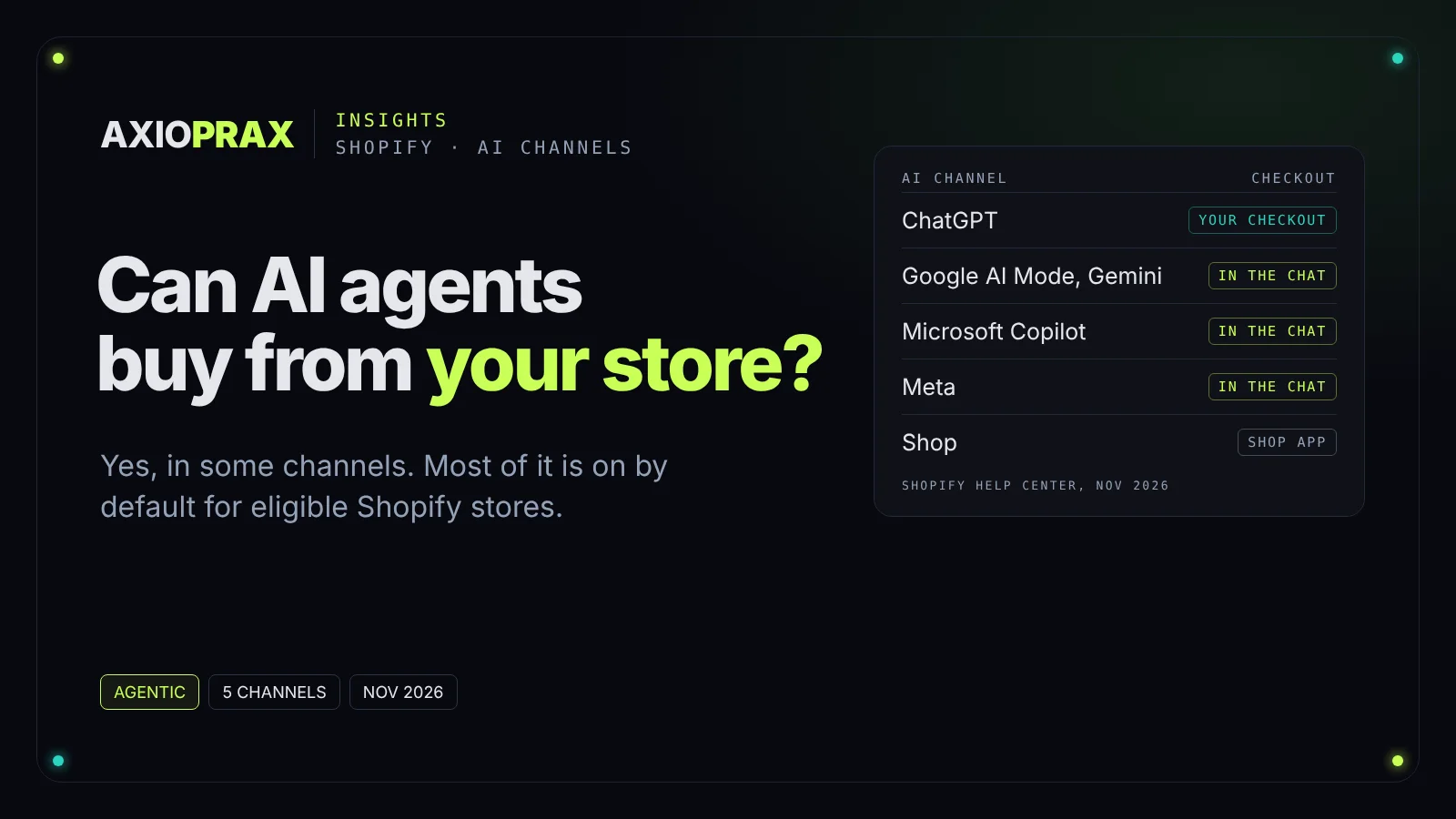
It is easy to assume AI shopping is something you sign up for later. On Shopify it is already running. Shopify's help page says agentic storefronts let customers discover and purchase your products in AI channels
and that the feature is active by default for eligible stores
(Shopify Help Center, agentic storefronts).
This piece covers what is live today, channel by channel, where the settings sit, what the agents actually read about your products, who owns the order, and the short list we would work through this week. Everything here comes from Shopify and OpenAI pages we opened on 31 October 2026 and checked again on 2 November. One honest limit up front: we have not yet placed an agent order on our own demo store, so there are no test results in this article, only what the platforms document.
Which AI channels can take an order today?
Shopify's help page names four third-party AI channels, and they work in two different ways. Shopify's own Shop app is a fifth agentic storefront, covered below.
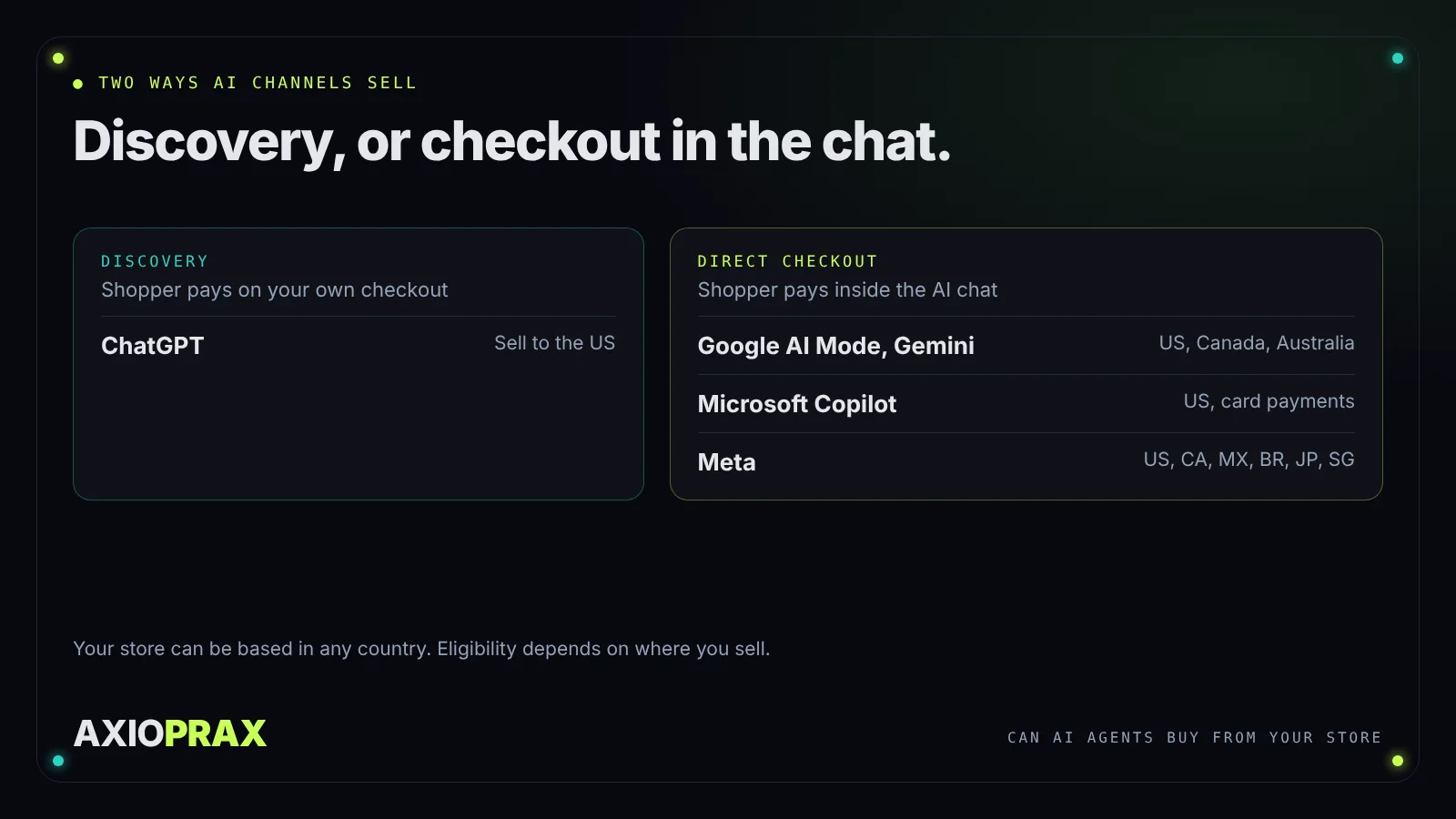
- ChatGPT is a discovery channel. Shoppers find your products in a chat, then pay on your normal online store checkout, opened in ChatGPT's in-app browser or a new tab. Shopify says there is
no option to activate or deactivate a ChatGPT direct checkout setting
(Shopify Help Center, selling on ChatGPT). OpenAI says shoppers can pay on your website with ChatGPT Wallet, andyour checkout processes the payment
(OpenAI, accept payments). - Google AI Mode and Gemini have direct checkout. The shopper clicks Buy, fills in shipping and card details, and pays without visiting your store (Shopify Help Center, selling on Google AI Mode and Gemini).
- Microsoft Copilot has direct checkout for US shoppers paying by credit or debit card (Shopify Help Center, selling on Microsoft Copilot).
- Meta surfaces such as Muse have direct checkout too (Shopify Help Center, selling on Meta).
There is one more route that gets less attention. Shopify's help page says customers can also pay with Shop Pay when they shop through personal AI agents, such as Muse and other agents they connect to Shop, and those orders show in your admin with attribution to the agent. You don't need to switch anything on for that. Shopify's 28 October 2026 announcement still describes Shop Pay checkout in personal AI agents as coming, so expect it to reach shoppers gradually (Shopify Fall '26 Edition).
Which stores are eligible, and where?
Eligibility depends on who you sell to, not where your business is based. That matters if you run your store from outside the US.
- ChatGPT: you must sell to customers in the United States, but your store can be based outside the United States.
- Google AI Mode and Gemini: you must sell to customers in the United States, Canada or Australia, and your store can be based in any country. You also need a valid Google Merchant Center account with your products in it.
- Microsoft Copilot: stores selling to US customers.
- Meta: stores selling to the United States, Canada, Mexico, Brazil, Japan or Singapore.
Each channel's page also asks for three completed policies in Settings, then Policies: Terms of service, Privacy policy, and Return and refund policy. And Google's direct checkout is still "rolling out gradually" to shoppers in those three countries, so a shopper without it is sent to your store to finish the purchase.
Shopify Catalog has its own account checks. Your store must be on the Starter plan or higher and not password protected, and Shopify reviews account standing over time: a verified email, two-step authentication, a history of real sales, prompt fulfillment and a low chargeback rate. If your store is not eligible, the Agentic page may show the reason next to Sources, then Shopify Catalog (Shopify Help Center, Shopify Catalog requirements).
Where does this live in your admin?
Everything sits in Sales channels, then Agentic. The default setting is "Allow Shopify to manage for me". With it on, AI channels can read your products through Shopify Catalog, direct checkout is on for the channels that offer it, and you are auto-enrolled in new agentic storefronts as they launch (Shopify Help Center, managing agentic storefronts).
From the same page you can see how many of your products are in Shopify Catalog, preview how they show in Catalog search, read sales, orders, sessions and conversion for each AI channel, and open your knowledge base.
If you are on Shopify's newer Agentic plan, the setup is different and direct checkout is off by default.
What do the AI agents actually read about your products?
Mostly Shopify Catalog, which is built from your product data. For Google AI Mode and Gemini, discovery comes from Google Merchant Center instead, fed either by the Google & YouTube sales channel, with automatic product and shipping sync turned on, or by a third-party feed provider or manual upload.
To be included in Shopify Catalog automatically, a product needs:
- A title and at least one product image.
- A price above 0. Free products are left out.
- To be published to your online store, or a Hydrogen or Headless storefront, with an identifiable product URL.
- Not to be Unlisted or hidden from search engines.
- Not to fall in an excluded category, such as alcohol, tobacco and vaping, weapons, services and add-ons, event tickets, or products Shopify classifies as Uncategorized.
That last point catches people out. Shopify classifies products from your product information, and that classification can differ from the product category that you set
in your admin. Thin titles and descriptions make a product more likely to be misread.
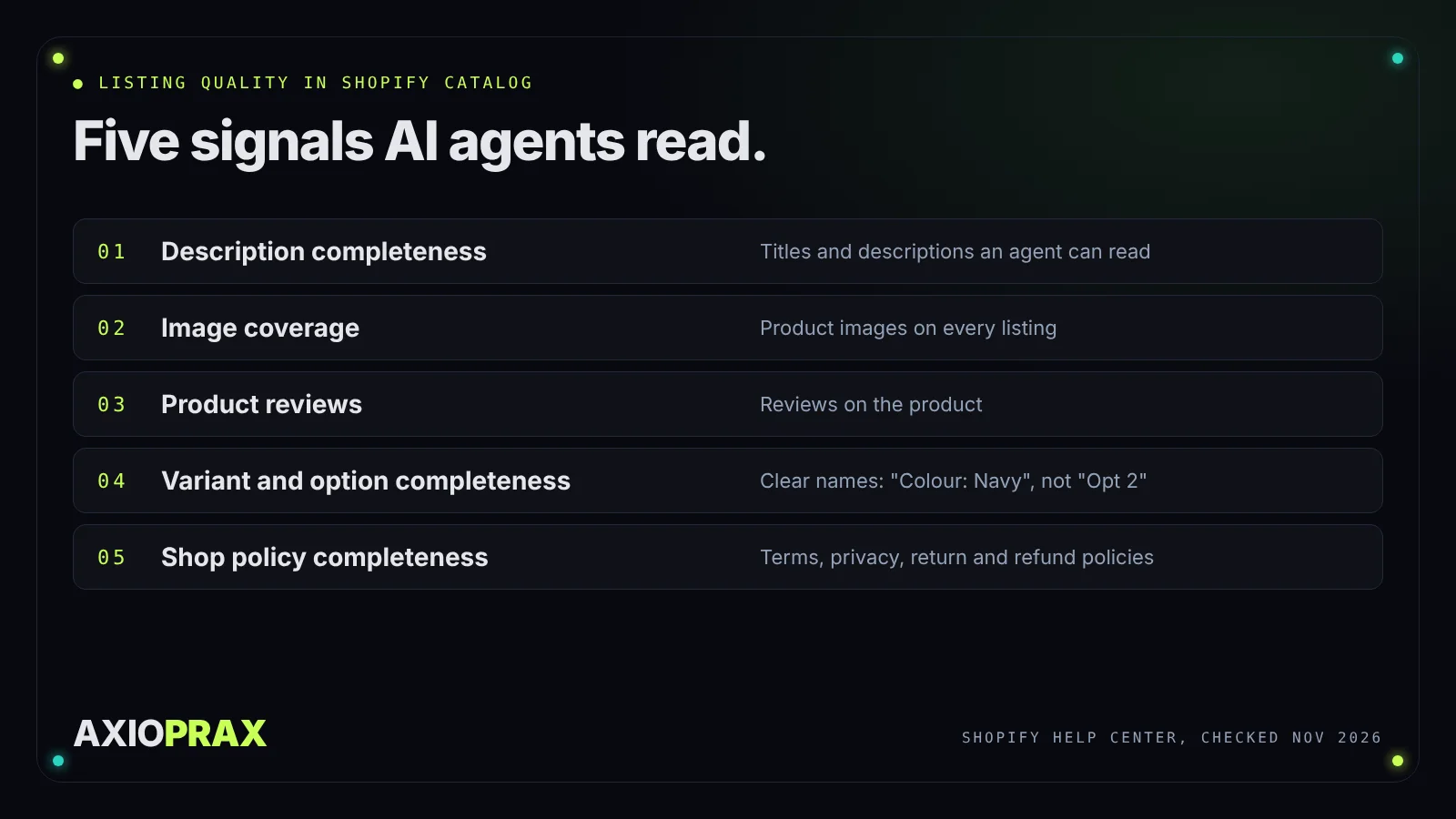
Inside the Agentic page, the search preview lets you enter a product name or keyword and see the raw Catalog results. Each product gets a Listing quality meter built from five signals: description completeness, image coverage, product reviews, variant and option completeness, and shop policy completeness. Shopify adds that the variant check looks for option names with acronyms or numbers that are hard for agents to understand. So an option named "Colour" with values like "Navy" reads better to an agent than one called "Opt 2".
Two more details from Shopify's channel pages: put any legal disclosures in the first 6,000 characters of the product description, and B2B-only products are not supported.
For questions that are not about one product, such as shipping times or returns, there is a knowledge base where you write the facts agents can use to answer. Since 26 October 2026 it is built into the Shopify admin, where Shopify drafts those facts from your storefront for you to review and publish (Shopify Changelog).
Who owns the order, and what changes at checkout?
You do. Shopify's terms say you remain the seller of record (Shopify Agentic Storefronts terms), and its help page says you retain full ownership of the customer relationship and post-purchase experience
. Orders from AI channels show in your admin with channel or referrer attribution.
Direct checkout is not a copy of your own checkout. Shopify documents the limits in most detail for Google AI Mode and Gemini, and Copilot and Meta have their own lists (Meta's page says checkout blocks aren't supported there at all). In Google AI Mode and Gemini:
- Google Analytics and custom pixels don't fire. Only server-to-server pixels for checkout started and completed run.
- Some checkout blocks, such as upsells, custom fields, loyalty, address autocomplete and trust badges, might not show.
- Subscription-only products, bundles, customisable products and B2B-only products can't be bought there.
- Local delivery, pickup in store and pickup points aren't offered.
- You can't require customers to sign in before checkout.
What does work: Shopify Functions such as shipping, discount and checkout validation functions, plus your automatic discounts and discount codes.
What does it cost?
For ChatGPT, Google AI Mode and Gemini direct checkout, Microsoft Copilot direct checkout and Meta's direct checkout, Shopify's help pages say there are no channel fees, only your standard payment processing fees. Shopify's Agentic Storefronts terms say you pay the fees for each channel that are set out in your admin, so treat the admin as the final word if it ever shows a fee.
How do you turn it off if you don't want it?
Go to Sales channels, then Agentic, and turn off "Allow Shopify to manage for me". You can then:
- Turn off direct checkout for one channel, so shoppers still find you but pay on your store.
- Turn off Shopify Catalog access for one channel, or for all third-party channels. Shopify says it
can take up to 7 days
before your data stops being shared, and turning Catalog access off also turns off direct checkout. - Turn off "Auto enroll new storefronts" so new AI channels are not added for you.
Two limits. Turning off Catalog access here does not apply to Shop, Shopify's own app, which is managed from its own sales channel settings, and it does not stop AI tools finding your public pages through web crawling. The only way to hide a product from every agentic storefront, Shop included, is the Unlisted status or the seo.hidden metafield, which also hides it from search engines like Google.
What should a store owner do this week?
Five jobs, in this order:
- Open Sales channels, then Agentic. Check you are eligible, which channels are on, and how many products are in Shopify Catalog.
- Complete your Terms of service, Privacy policy, and Return and refund policy in Settings, then Policies.
- On your top 20 products, tighten titles and descriptions, add images, set clear variant option names, and move any legal disclosure into the first 6,000 characters.
- Review the facts in your knowledge base, especially shipping and returns, then try three product names or keywords a shopper might use in the search preview.
- If you sell to the US, Canada or Australia, connect Google Merchant Center and check whether you sell subscription-only products, bundles or customisable products, or offer pickup, because Google's direct checkout does not support them.
If you rely on Google Analytics or client-side pixels to count sales, expect gaps, because Google's direct checkout fires only server-to-server pixels.
When is this not worth your time yet?
If you don't sell to the US or any of the countries above, most of this does not reach your shoppers today. And if your catalogue is mostly services, event tickets or other excluded categories, those products will not be in Shopify Catalog at all.
None of this guarantees an AI channel will recommend you. Shopify's listing quality meter describes what generally helps a product rank, not a promise. What it does mean is that a store with complete product data and policies is one these agents can read properly.
For app builders: Shopify's Global Catalog REST API stopped serving traffic on 2 November 2026, and apps that still call it need to move to Global Catalog MCP (Shopify developer changelog).
If you'd like a hand checking your store's Agentic page, book a free 20-minute call.