Most n8n vs Zapier comparisons end with an affiliate link. This one doesn't. We have no deal with either company, and we think the honest answer is simpler than the usual feature tables make it look: the two tools bill for different things. Once you see what each one counts, the choice for your store usually makes itself.
The prices here come from each vendor's own pricing page, read on 20 October 2026. They change, so check them again before you commit to anything.
What each one actually counts
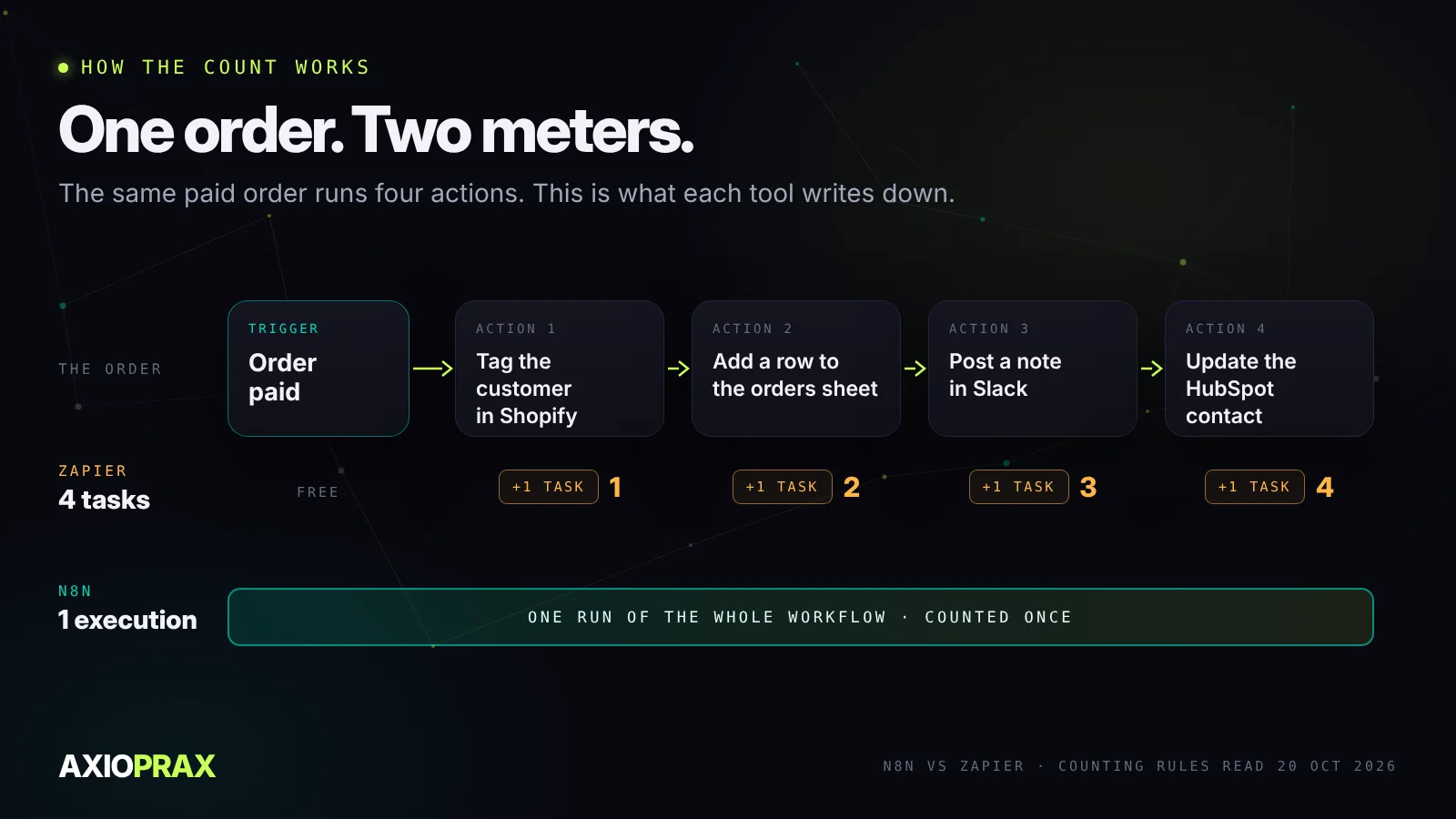
Zapier counts tasks. A task is one action that worked: a row added, a contact updated, a message sent. The trigger that starts the Zap is free, so are Filter and Paths steps, and an action that fails doesn't count either. Zapier's help centre spells all of this out. So a Zap with one trigger and four actions uses four tasks every time it runs.
n8n counts executions. An execution is one run of the whole workflow, start to finish, and it makes no difference whether that run has three steps or thirty. The same four-action workflow on n8n costs one.
That single difference explains most of what people say about the two. Zapier gets expensive when workflows get long. n8n doesn't, but it asks more of you in other ways, which we'll come to.
The plans, side by side
Zapier's free plan gives you 100 tasks a month and only two-step Zaps. Professional starts at $19.99 a month and Team at $69, and how many tasks you get depends on the tier you pick (Zapier pricing). Worth knowing before you sign up: when you hit your limit, Zapier moves you onto pay-per-task billing at a higher rate, unless you've turned that off. If you have, your Zaps pause.
n8n Cloud starts at €20 a month, billed annually, for 2,500 executions. Pro is €50 a month for 10,000 (n8n pricing). You can also run n8n on your own server with the free Community Edition, and that's where most of the savings people talk about come from. It isn't free in time, though. Someone has to keep it updated and backed up.
| Zapier | n8n | |
|---|---|---|
| What it counts | Each action that succeeds | Each run of the whole workflow |
| First paid plan | Professional, from $19.99 a month | Starter, €20 a month billed annually, 2,500 runs |
| Free option | 100 tasks a month, two-step Zaps | Community Edition on your own server |
| Who runs it | Zapier | n8n Cloud, or you |
| When you hit the limit | Pay-per-task at a higher rate, or Zaps pause | Move up a plan |
One store flow, priced both ways
Take a flow almost every growing store ends up wanting. When an order is paid, tag the customer in Shopify, add a line to the orders sheet, drop a note in the team's Slack channel, and create or update the contact in HubSpot. One trigger, four actions.
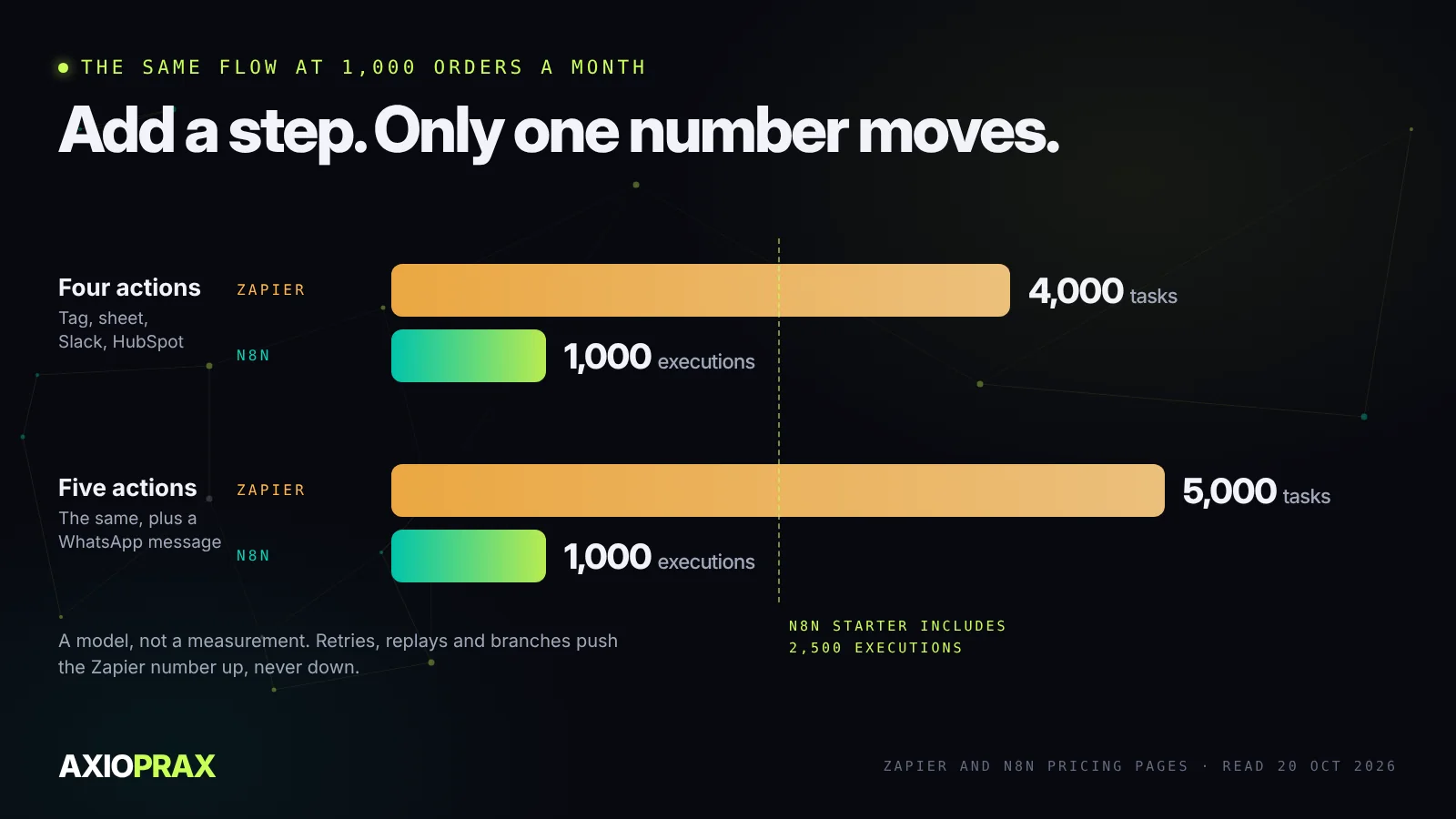
Say you do 1,000 paid orders a month. Swap in your own number.
On Zapier that's 4,000 tasks. On n8n it's 1,000 executions, which is 40% of the Starter plan.
Now the bit that matters. Six months later someone asks for a WhatsApp shipping message on top. Zapier goes to 5,000 tasks. n8n stays at 1,000. Every step you add to a Zapier workflow lands on the bill, and on n8n it doesn't.
We're not going to quote you a Zapier price for 4,000 tasks. The pricing page doesn't list one per tier, and the selector changes, so put your own volume in and look.
Also, this is a model. Retries, replays and branches move the numbers, and on the Zapier side they almost always move them up. If you want the full arithmetic, including Make and what polling costs on each platform, we wrote it up in tasks, credits and executions.
Where Zapier wins
We'll be fair to Zapier, because it earns it. If nobody on your team wants to think about servers, it's the obvious pick. The editor is easier for someone building their first automation, the app library is huge, and short two- or three-step jobs cost very little. If all you want is each new order landing in a Google Sheet, Zapier is fine. More than fine.
Where n8n wins
n8n pays off when workflows get long or messy. Branches, loops, a bit of code to clean up a supplier's CSV before it goes anywhere near your stock levels. It can call any API through its HTTP Request node, so you're not waiting for someone to build an integration for the small 3PL you happen to use.
The other reason is data. Self-hosted n8n keeps everything on a server you control, and for some businesses that settles it. Just go in clear-eyed: updates, backups and who has access become your job, or your developer's.
Before either one, look at Shopify Flow
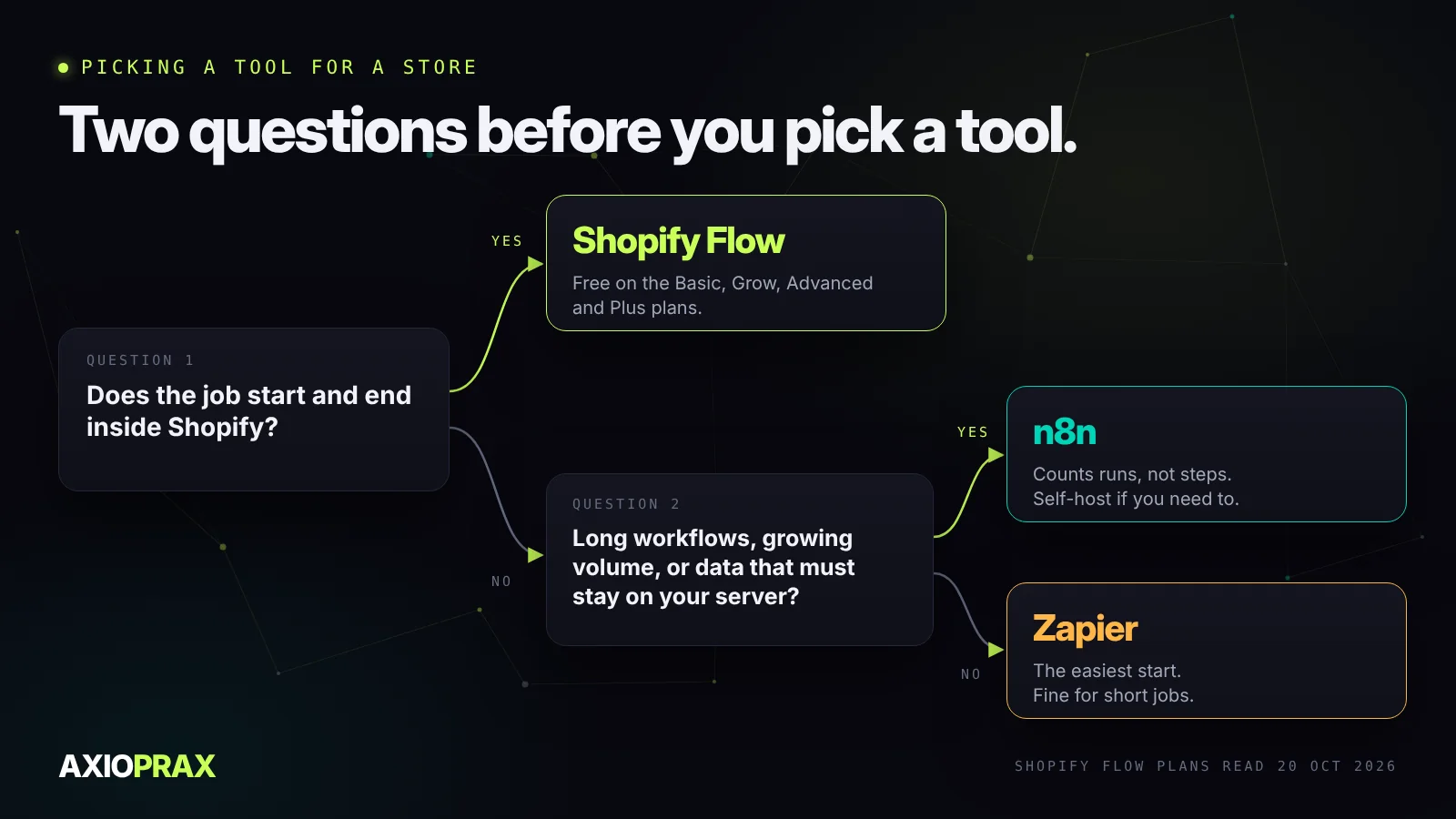
If you run a Shopify store, check what you already have. Shopify Flow is free on the Basic, Grow, Advanced and Plus plans, and a lot of store automation never needs to leave Shopify at all. Tag a customer after their third order. Hold an order that looks risky. Tell someone when a product runs low. Flow handles all of that.
The catch is that Flow lives inside Shopify. Its Send HTTP request action, which is how it talks to other apps, only comes with Grow and above. So the moment a job needs your supplier sheet, your CRM or a carrier, that's when n8n or Zapier earn their place.
We follow the same rule in our own kits. Fraud Hold, for example, is just Shopify Flow rules: hold the fulfilment order, tell a named person, wait for them. Nothing in that job needs a second tool, so it doesn't get one.
So which one?
Our short version. If the rule starts and ends inside Shopify, use Flow. If your workflows are short and nobody wants to look after anything, use Zapier. If your workflows are long, your order volume is climbing, or your data needs to stay on your own server, use n8n.
When we build, we end up on n8n when a workflow has a lot of steps or the data has to stay put, and on Flow when the job lives inside Shopify. If you're not sure where your store falls, that's what the Store Ops Audit is for. It goes through the automations and apps you already run and tells you what to fix first.