
On the first working day of the month, someone in most small businesses opens the accounting software, the CRM, the bank and maybe Shopify, copies numbers into a spreadsheet, tidies it up and emails it round. It takes a few hours, it looks the same every month, and it's exactly the kind of job a computer should be doing.
This guide covers how monthly reporting automation works, the one thing to settle before you build it, what changed in Xero's and Intuit's API pricing over the past year, how to handle revenue that comes from Shopify, and how to automate supplier bills while you're at it. Facts were checked on the vendors' own pages on 20 October 2026.
What goes in the report
A good monthly report for a small business fits on one page. Usually it covers:
- Revenue against budget and against last month
- Gross margin and cost of goods sold
- Operating costs by category
- Cash in the bank and how long it lasts
- Who owes you money, and how late they are
- What you owe, and when it's due
- Two or three business numbers you actually steer by, such as orders, pipeline or churn
How the automation works
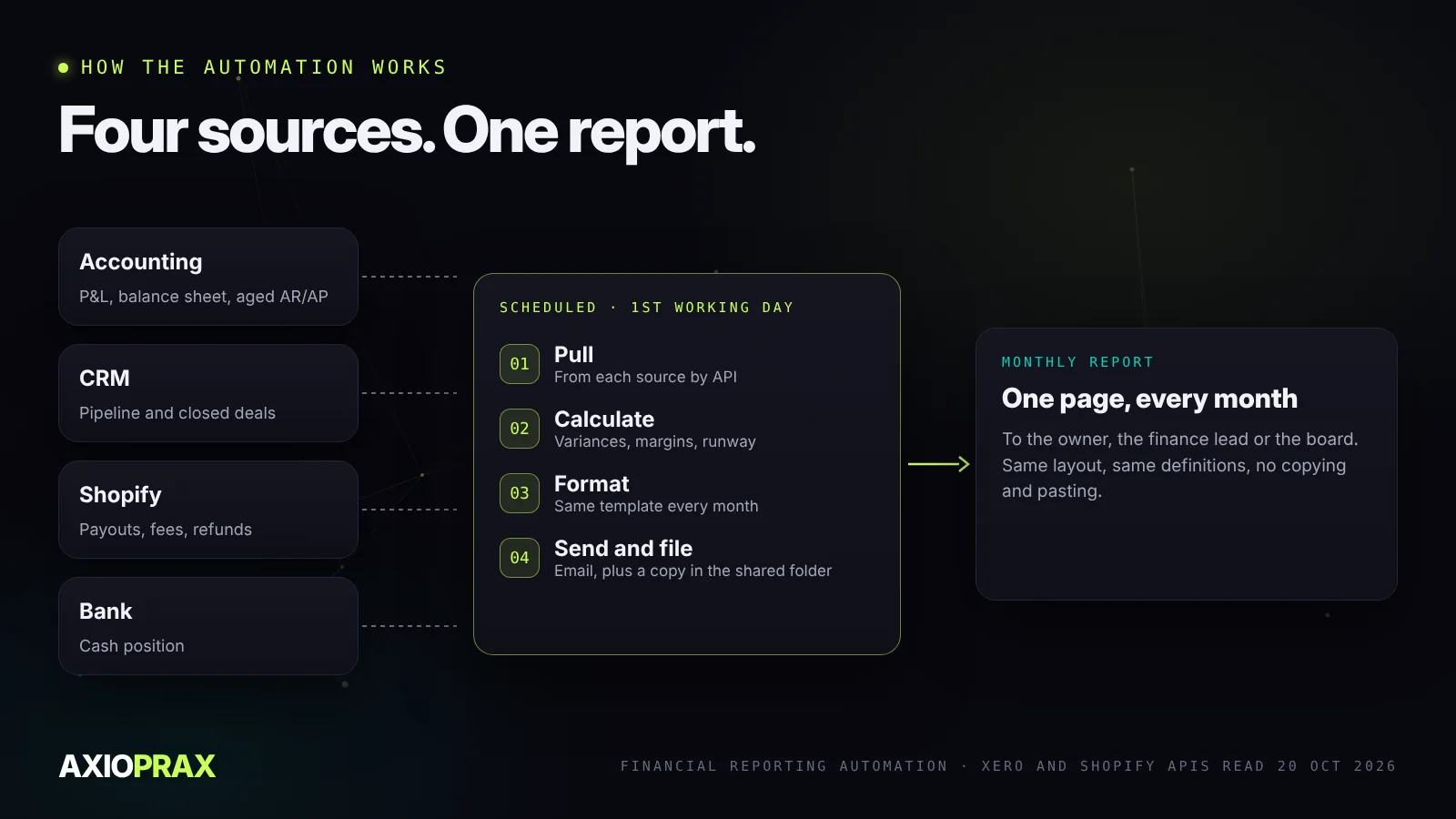
The workflow runs on a schedule, usually early on the first working day of the month, and does four things.
- Pull the data. Xero's API has ready-made report endpoints for profit and loss, balance sheet, and aged receivables and payables (Xero). QuickBooks Online has a Reports API that covers the same ground. Pipeline numbers come from your CRM, and store revenue from Shopify.
- Calculate. Variances against budget and last month, margins, and how many days of cash you have.
- Format. The same template every month, as a PDF, a Google Doc or a plain email.
- Send and file. To the owner, the finance lead or the board, with a copy saved to a shared folder.
Settle what every number means first
This is where reporting automation usually goes wrong, and it has nothing to do with technology. "Revenue" can mean gross sales, sales after refunds and discounts, revenue recognised in the period, or cash that actually arrived. All four are reasonable. They give different answers for the same month.
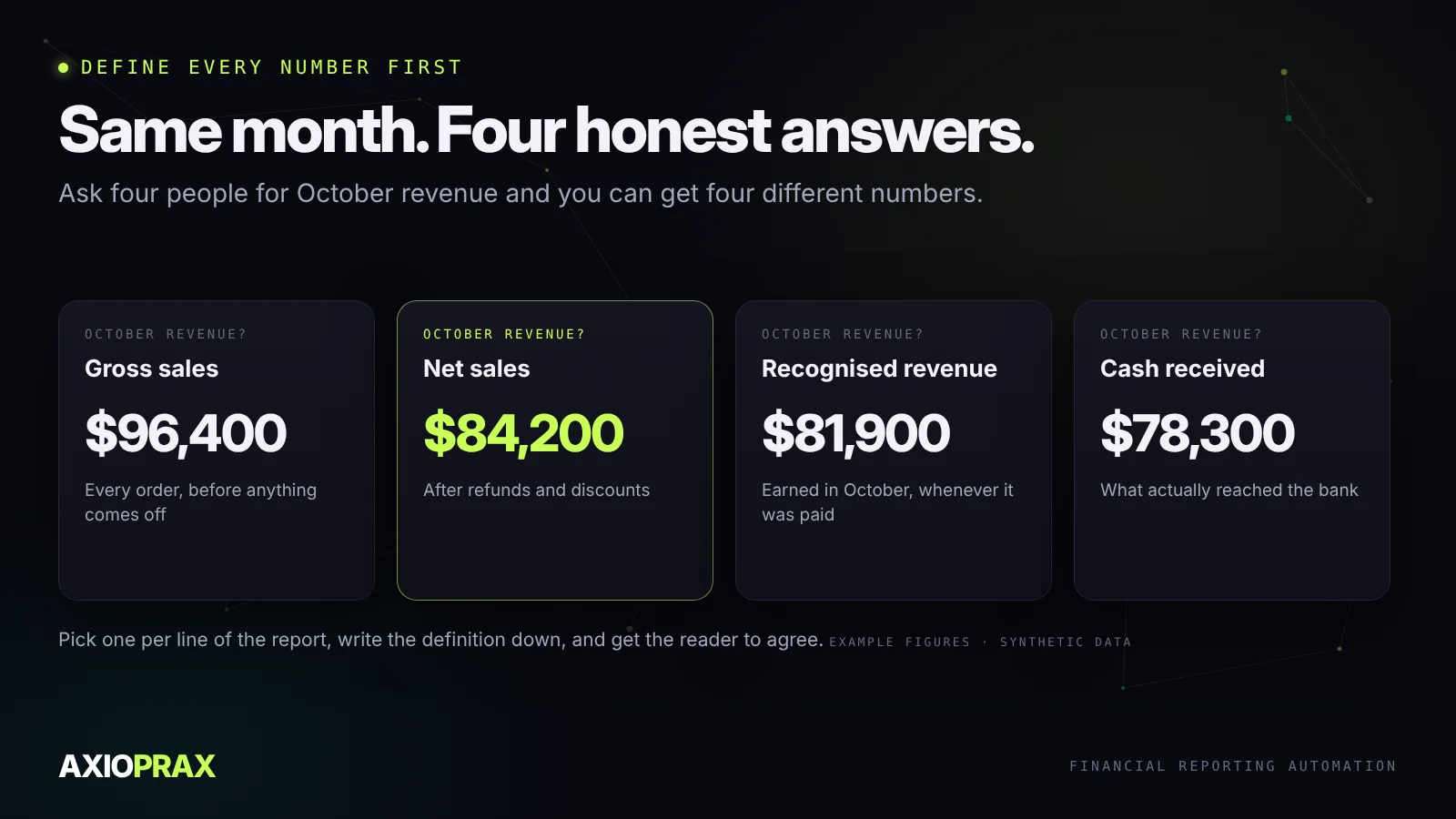
If the report calculates a number differently from how the owner reads it, the automation creates confusion instead of saving time. So before anything gets built, write a one-line definition for every number on the report and get the person reading it to agree. Then lock the format. An automated report expects the same layout every month.
What changed in Xero and QuickBooks API pricing
Both big accounting platforms changed how they charge apps for API access over the past year. It's worth knowing before you build.
- Xero moved to new developer tiers on 2 March 2026 (Xero FAQ). Starter is free for up to 5 connections. Paid tiers start at A$35 a month for 50 connections (Xero pricing). Integrations built for your own business or a single client are exempt, and so are custom connections. Xero's updated terms also stop developers from using data from its APIs to train AI models.
- Intuit launched its App Partner Program on 28 July 2025 (Business Wire). Sending data into QuickBooks is free, but reading data out, including fetching reports, is metered. The free Builder tier includes 500,000 of those calls a month. Variable fees started in the US on 1 November 2025, and the programme reached the UK, Australia and Canada on 3 November 2025 (Intuit).
For a business automating its own monthly report, neither change is likely to cost anything. They matter more if you're an agency or app connecting many clients.
If your revenue comes from Shopify
Store owners often report Shopify payouts as revenue. They're not the same thing. A payout is what's left after Shopify takes fees, refunds and chargebacks, sometimes across several days of orders.
Shopify's API exposes each balance transaction with its amount, fee, net figure, type and the payout and order it belongs to (Shopify). That's enough for an automation to break every payout into sales, refunds, fees and adjustments, match it to the bank, and show true revenue and fees in the monthly report. Shopify's own Finances reports in the admin are a good place to check the totals against.
Automate the bills while you're at it
The other half of the month-end grind is supplier bills: downloading invoices, typing them in, checking them against what was ordered, getting them approved and paying them. Automation handles this in five stages.
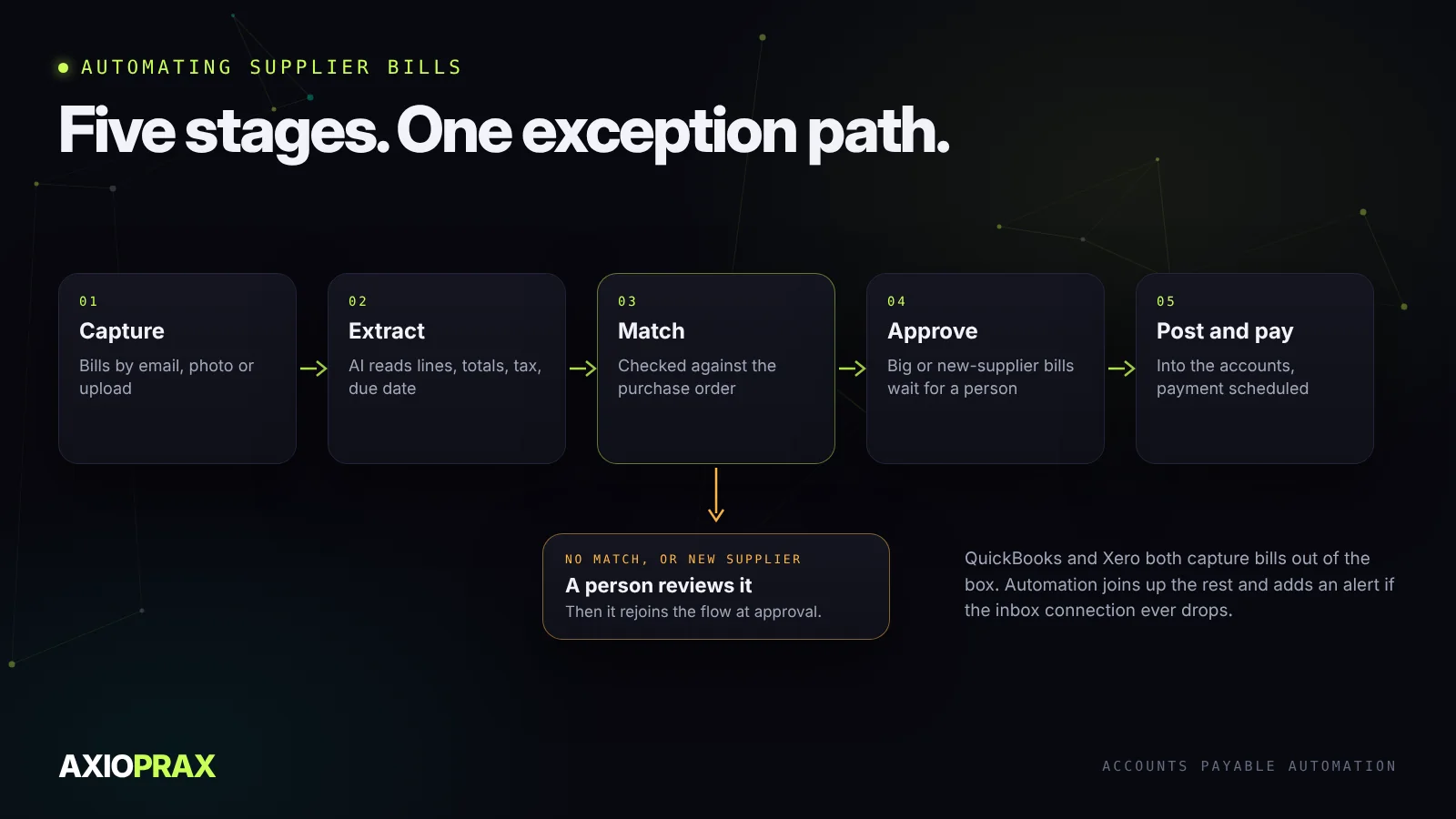
- Capture. Both platforms now do part of this out of the box. QuickBooks lets you forward bills to a dedicated email address and pulls out the date, amount and supplier (QuickBooks). Xero's smart document capture is included on all its small business plans and takes bills by email, photo or upload (Xero).
- Extract. AI reads the line items, totals, tax and due date. Be wary of accuracy claims. We couldn't find independent data on how accurate invoice extraction is, only vendors' own figures, so keep a person checking anything from a new supplier or an unusual layout.
- Match. Check each bill against the purchase order. Skipping this is easier to build and a real fraud risk.
- Approve. Small, matched bills go straight through. Large ones, or anything from a new supplier, wait for a named person.
- Post and pay. The approved bill goes into the accounting software and the payment gets scheduled.
One thing people forget: alerting. If the inbox connection drops, bills stop flowing silently. Build an alert from day one.
A rule change worth knowing about
If you invoice in the UK, the government has confirmed mandatory e-invoicing for all VAT invoices from 2029, with a detailed roadmap promised at Budget 2026 (GOV.UK). In the EU, digital reporting for cross-border business sales starts on 1 July 2030 (European Commission). Neither is urgent today, but automating your bills and invoices now means you won't be scrambling later.
Where to start
Write down the report you want, line by line, with a definition for each number. List where each number lives. Then automate the pull for one month and compare it with the report you made by hand. When the two match, switch off the manual version.