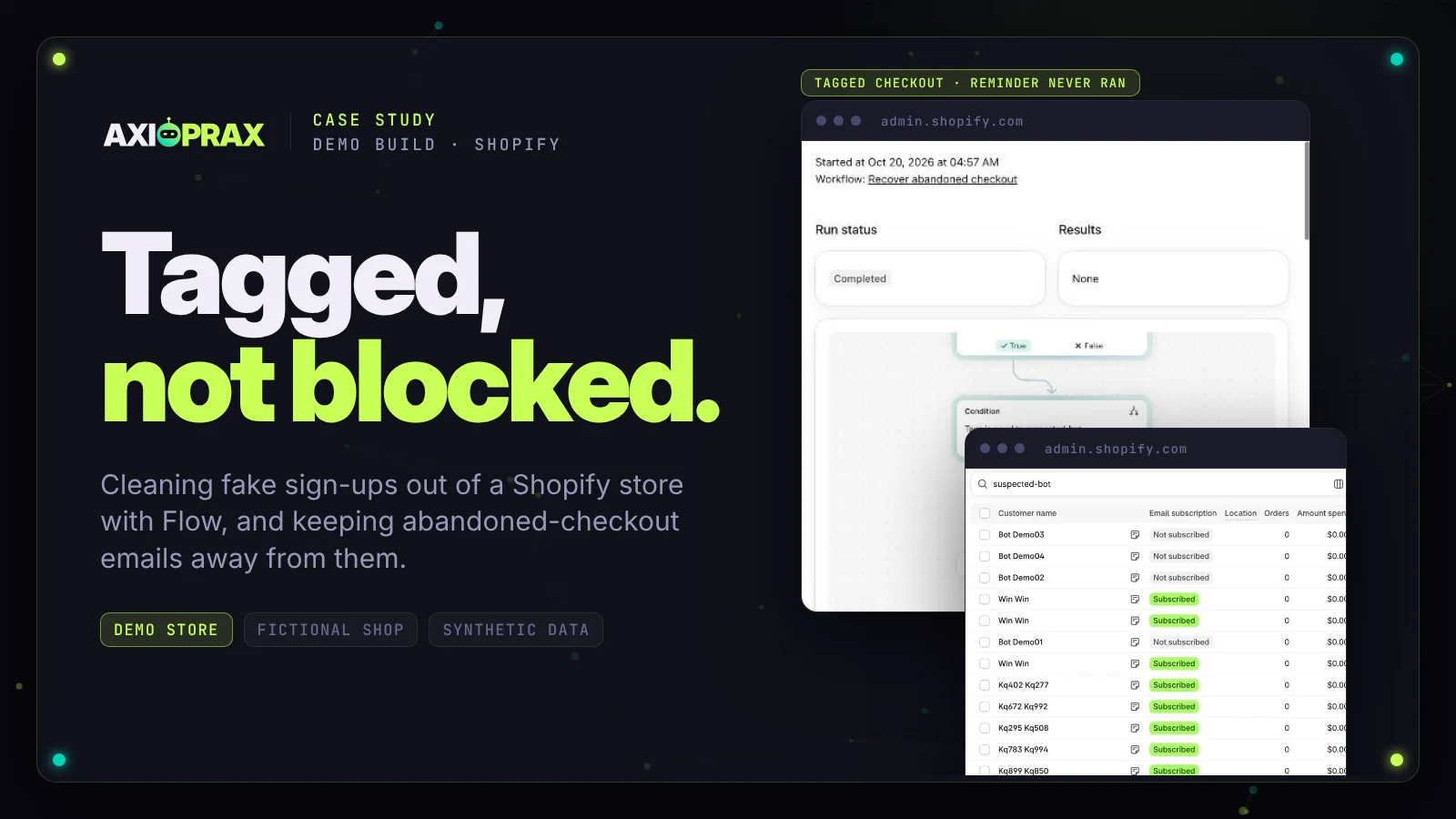
Shopify's September 2026 analytics update filters identified bot sessions out of session reports by default. It doesn't block them. Shopify says bot filtering applies only to sessions-related metrics
, and its changelog says orders, sales and customer counts aren't changed, so fake sign-ups are still in your customer list, still on your email bill and still able to start abandoned-checkout emails. This is how we cleaned that up on our own demo store with Shopify Flow: a tag on suspected bot accounts, a guard on the abandoned-checkout email, and a safety net for real buyers. It is for merchants whose customer list or email bill is growing faster than their sales. Our kit, KIT-02 Bot Cleanup, does not block bots, and nobody outside Shopify can.
What the kit includes and its price are on the KIT-02 Bot Cleanup page.
This is a demo build, not a client project. Everything below was built and tested on Northfield Outfitters, our own Shopify development store: demo store, fictional shop, synthetic data, real tools. There are no client results in this article.
Key points
- Shopify's bot filtering applies only to session metrics. It hides identified bots from session reports and does not block them (Shopify Help Center, bot filtering, checked 20 October 2026).
- Klaviyo doesn't bill suppressed profiles, Mailchimp still bills unsubscribed contacts, and Shopify Messaging bills per email sent, so the fix depends on the email tool (each vendor's help pages).
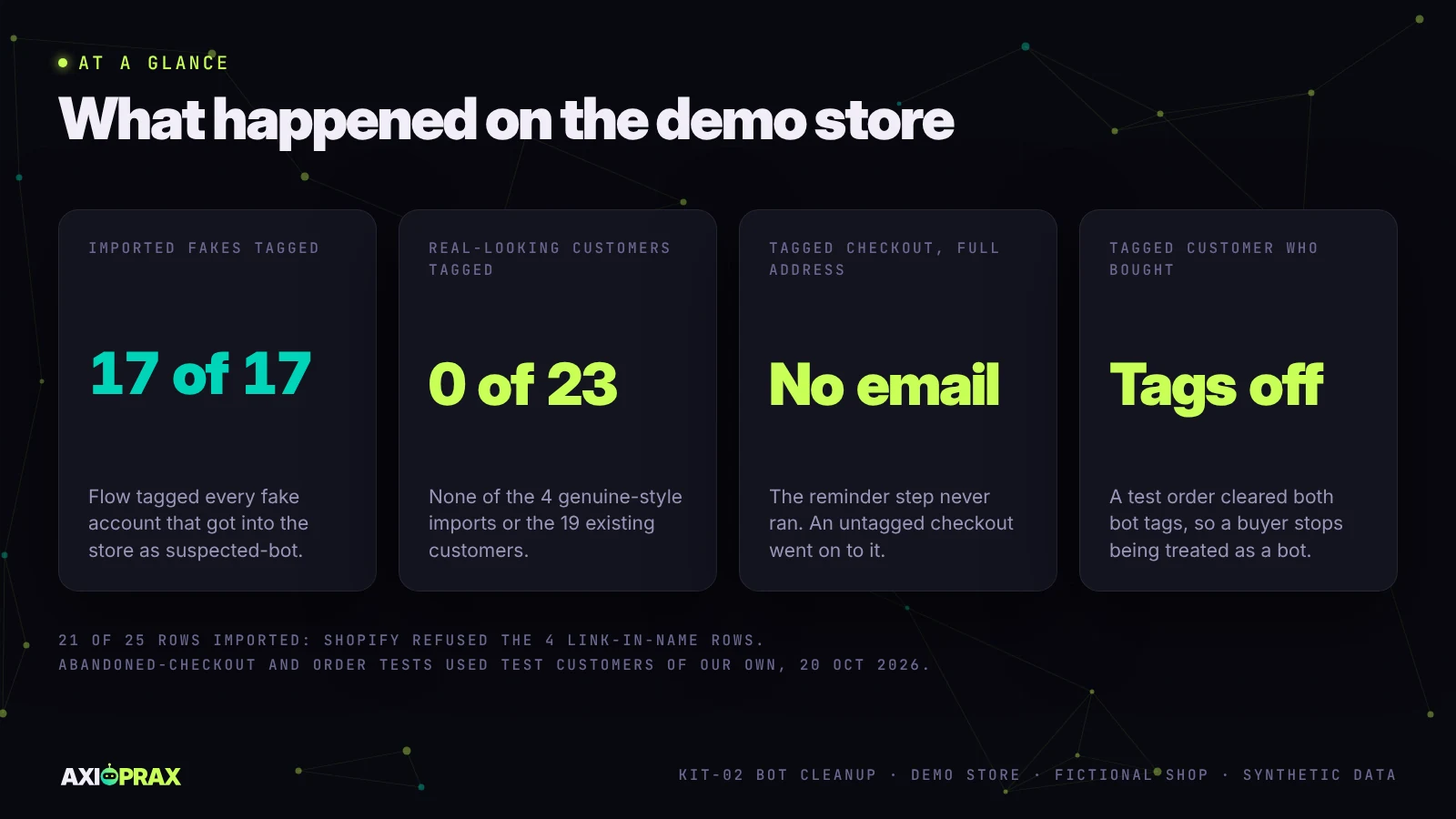
- On our demo store, a Flow workflow on Customer created tagged 17 of 17 imported fake accounts and none of the 4 genuine-style or 19 existing customers.
- The kit's abandoned-checkout guard is tag-only: no reminder for an account tagged suspected-bot. On the demo store a tagged test customer with a full address got no reminder step, and an untagged one with no address went on to it.
- A third workflow takes the tags off anyone who places an order. A tagged test customer's $1 order cleared both tags.
- We never delete. You decide. Axioprax tags, suppresses or archives only after the owner approves the list, and anyone with an order is protected.
What did Shopify's bot filtering change?
Your session reports. Nothing else. The rollout ran from 21 to 23 September 2026, and once it reached a store, identified bot sessions are filtered out of session-related reports by default
(Shopify Help Center, bot filtering). You can bring them back one report at a time with the "Human or bot" filter. Sessions from before 7 October 2025 aren't classified at all.
Shopify's changelog post on the update says Orders, sales, and customer counts aren't changed
and asks merchants to treat the new figures as a new baseline (Shopify changelog, session measurement improvements). Conversion rates look more believable now. The fake accounts haven't gone anywhere.
Why doesn't Shopify just block the bots?
Its help page says blocking bots from a site entirely has drawbacks, so Shopify's approach is to display and filter bot traffic in analytics instead (same page). We don't put a firewall in front of Shopify for clients either.
Merchants on the Shopify Community describe what is left. One Plus merchant reported abandoned checkouts rising from about 130 in August to more than 11,000 after 1 September (Shopify Community thread 684931). Another thread counts 2,066 bot accounts (thread 607939). Those are individual merchants' reports, not a benchmark.
Where do bots cost a Shopify store money?
Mostly in the email tool, and each tool counts differently.
Klaviyo bills on profiles it can email, and suppressed profiles don't count towards the plan (Klaviyo Help). Mailchimp is the one that catches people out: subscribed, unsubscribed and non-subscribed contacts all count, and only archived, cleaned or deleted contacts stop counting (Mailchimp Help). Unsubscribing a bot there saves nothing. Archiving does, though Mailchimp notes that archiving isn't a legal substitute for deletion.
Shopify Messaging, which used to be Shopify Email, bills per email sent: 10,000 free a month, then $1 per 1,000 up to 300,000 emails (Shopify Help Center, Shopify Messaging pricing). Abandoned-checkout automation emails don't count towards that. So for a Messaging store under the free allowance the saving is $0, and the gain is cleaner open rates.
What does the Bot Cleanup kit include?
Six parts. The damage report comes first, because it shows what the rest is worth on your own plan.
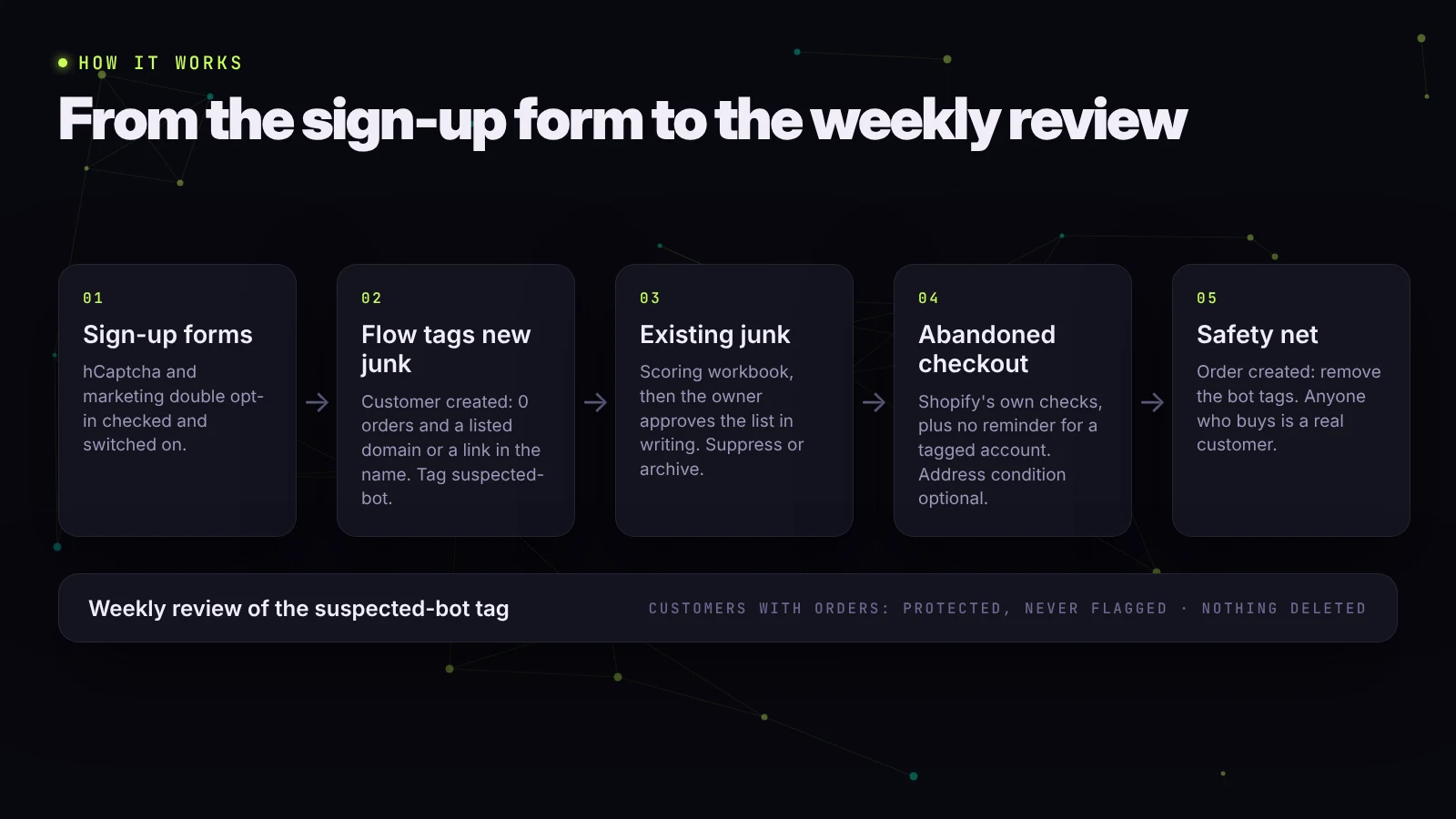
- Bot damage report. One page in plain English: how many accounts look automated over the last 90 days, where the fake traffic comes from, and what it costs on your own email plan.
- Sign-up form check. hCaptcha and Shopify's marketing double opt-in, or the equivalent settings in Klaviyo or Mailchimp.
- Scoring workbook and approved list. Every customer scored on six signals. Anyone with an order is marked PROTECTED and can't be flagged. You approve the list in writing before anything changes.
- Suppression in your email tool. Suppress in Klaviyo, archive in Mailchimp, or leave out of Shopify Messaging sends. We never delete customers or profiles.
- Shopify Flow workflows. One tags new suspected bots, one keeps abandoned-checkout reminders away from tagged accounts, and a third removes the tags if a tagged customer buys.
- Handover. Session reports shown with bots hidden and included, and a note on reviewing the suspected-bot tag each week.
If you are looking at Flow for other store jobs as well, our guide to Shopify automation workflows covers more of them.
What did we build it on?
Northfield Outfitters, a fictional shop on a Shopify Plus development store of ours. Before we started it had 19 customers, 16 of them with orders, no email app and no Flow. We installed Flow and it ran. Shopify's development store page only mentions Flow for Plus, so we can't say whether it runs on other kinds.
We then wrote a 25-row customer file on reserved test domains: 21 fakes in four patterns (random addresses on three throwaway-style domains, and a link in the name) and 4 genuine-style customers, one with capital letters in the address and one with a plus sign in it.
Were the sign-up forms already protected?
Partly. hCaptcha was already on for contact and comment forms and for login, create account and password recovery pages, which matches Shopify's note that it is on by default (Shopify Help Center, online store preferences). Marketing double opt-in was off. We turned it on under Settings, Notifications, Customer notifications.
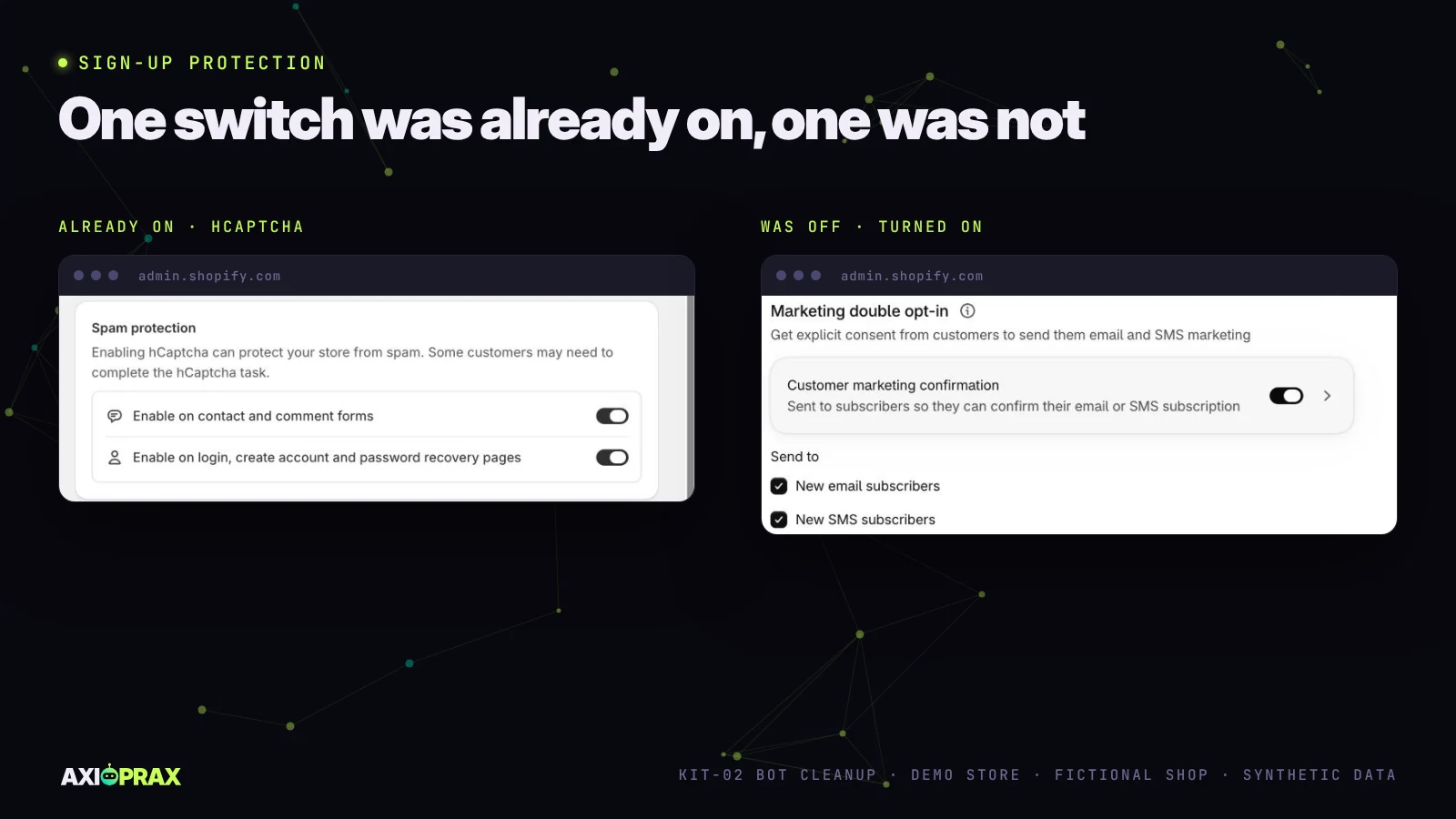
Shopify's documents disagree about whether hCaptcha covers the newsletter form. The test theme on our demo store has no newsletter form at all, so we couldn't check it there. The kit tests that form on each client's store before relying on it.
How do you tag suspected bot customers in Shopify Flow?
With a workflow on the Customer created trigger. Ours checks that the customer has 0 orders, then checks whether the email ends with one of the listed throwaway domains or the first or last name includes "http". If either is true, Flow adds the tag suspected-bot.
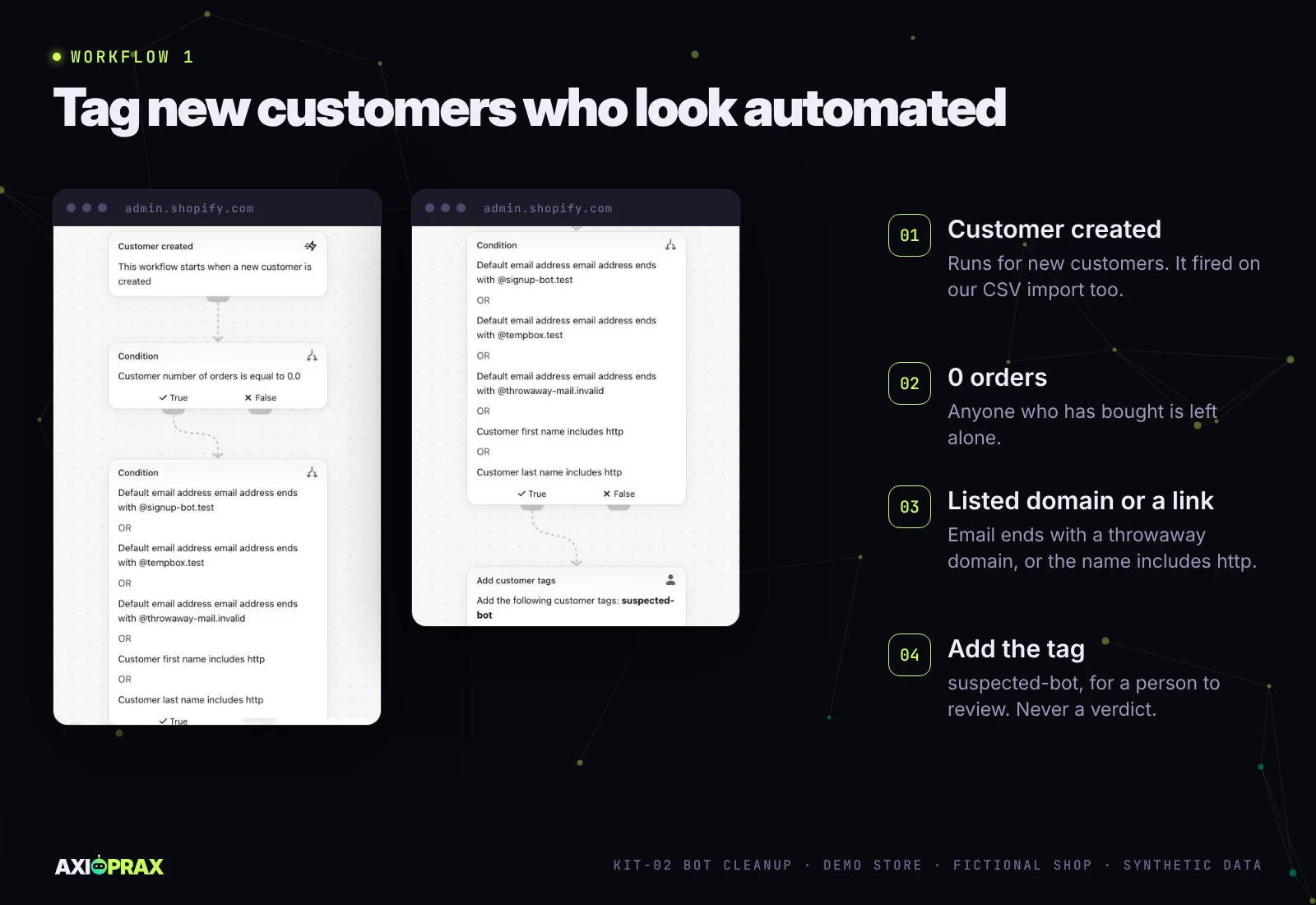
The email check uses the customer's default email address field, because Shopify lists the older email field as deprecated (shopify.dev, Customer object). We drafted it with Flow's own assistant from our written spec and checked each step against the spec before turning it on. The tag is a flag for a person to review, never a verdict.
Does Customer created fire on a CSV import?
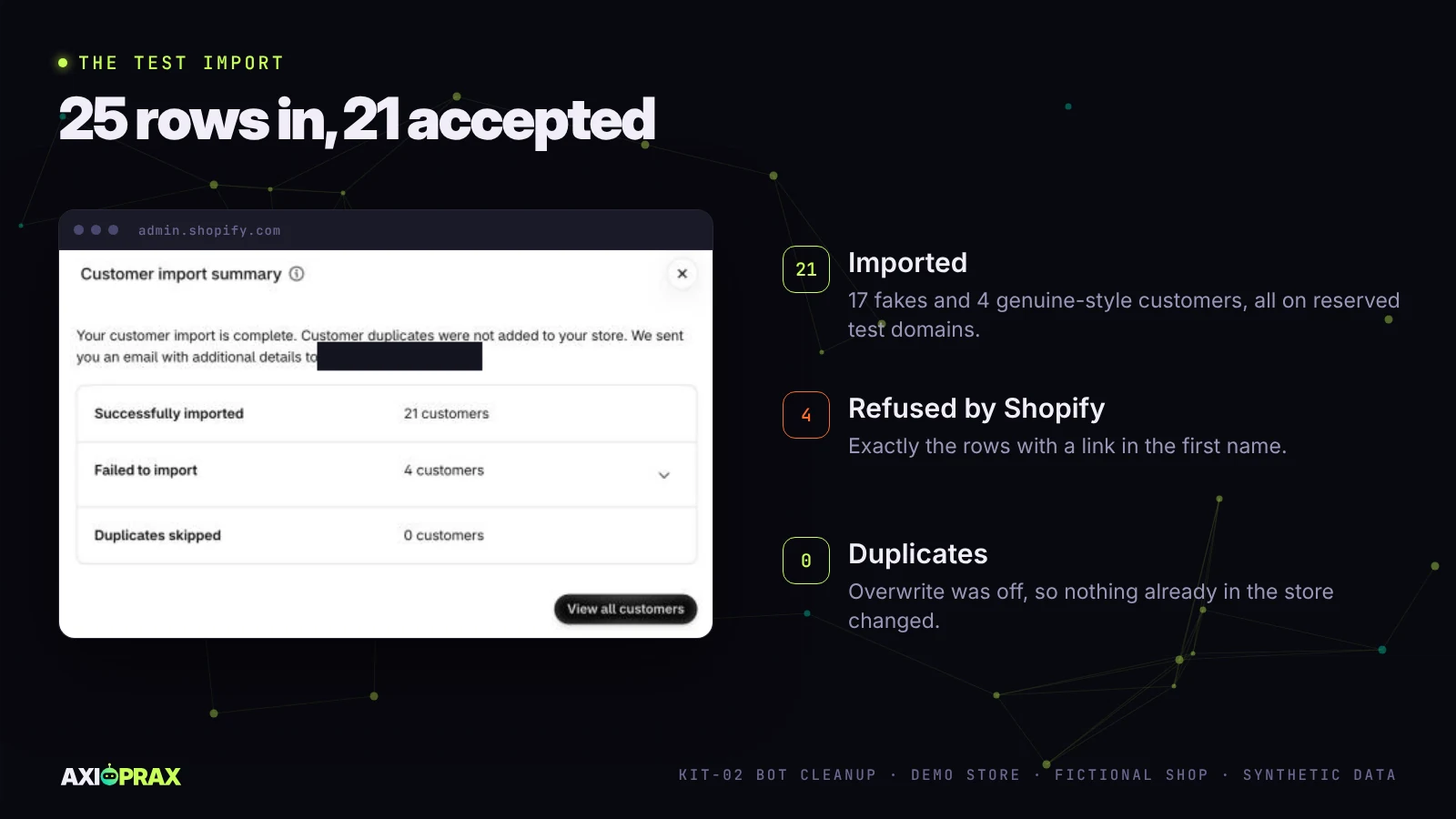
On our store it did, although Shopify's help page only mentions new orders and profiles created by hand. We imported the 25 rows with overwrite off. Shopify brought in 21 and refused 4, with 0 duplicates, and the 4 it refused were exactly the rows with a link in the name.
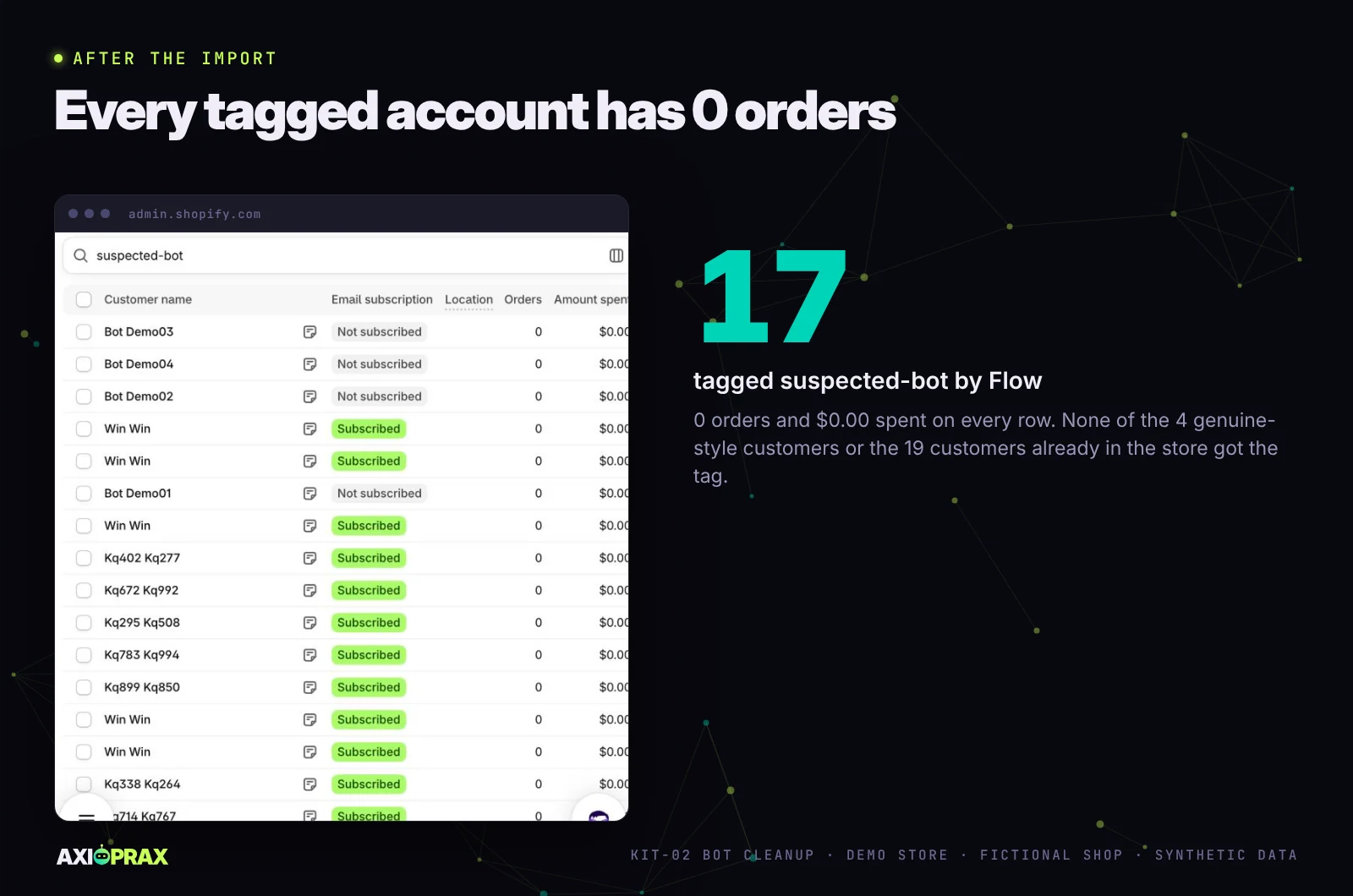
Flow ran on the import. All 17 fakes that got in were tagged suspected-bot. None of the 4 genuine-style customers was tagged, and neither was any of the 19 customers already on the store.
Because Shopify refused the link-in-name rows, the "http" part of our condition never met a real record. Flow also ran each time one of our test checkouts created a customer, judging by the run times. We haven't tested storefront account sign-ups: the store uses Shopify's newer customer accounts, and creating one is the owner's job, so the kit checks it on each client's store.
Is the Ends with check case-sensitive?
Not on our store. We created a customer by hand as KQ7X9Z2W4V@SIGNUP-BOT.TEST with 0 orders. Shopify kept the address in capitals, as typed, and Flow still matched it and tagged it.
What about the bots already in the list?
Flow only sees new customers, so existing junk goes through the scoring workbook. It scores every row on six signals, and anyone with an order is PROTECTED whatever the address looks like. Run on the 25-row demo file, it flagged 21 of 21 fakes (scores 7 to 10) and 0 of 4 genuine-style customers, who all scored 1 or 2 and read OK. In our 24-row edge-case file, a real buyer on a throwaway-looking domain stayed PROTECTED. A burst of nine real newsletter sign-ups within 35 minutes wasn't flagged: seven read OK, and the two with a birth year in the address landed in REVIEW for a person to check. Three bot sign-ups on a test domain within three minutes were still flagged.
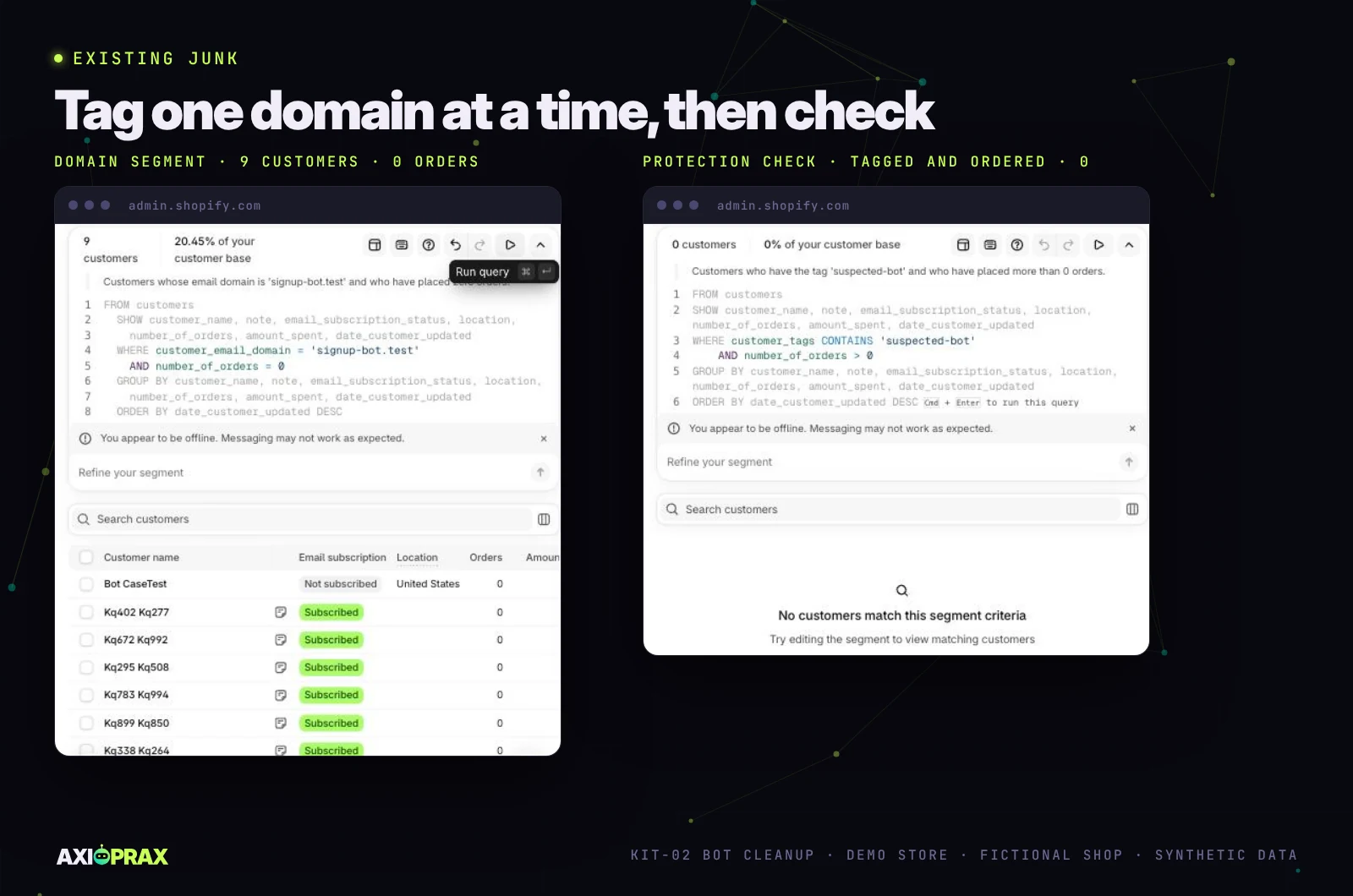
Bulk tagging goes one listed domain at a time, and on a client's store only after the list is approved. In the segment editor we ran customer_email_domain = 'signup-bot.test' AND number_of_orders = 0 and got 9 customers: the 8 imported fakes on that domain and our capital-letters test account. We selected all 9 and added the reviewed tag in one step. Then came the check the kit never skips: two segments for tagged customers with at least one order. Both returned 0. We also ran the demo store's own customer export through the workbook, in both of Shopify's CSV formats. The results matched row for row: all 17 customers with an order were PROTECTED, all 17 imported fakes and the capital-letters test account were flagged, and a test account we added later on a listed domain, with an ordinary-looking name, landed in REVIEW for a person to check.
REVIEW means a person looks. It never means a quiet approval: the workbook asks for a written reason before a REVIEW row can go on the approved list, and it refuses anyone with an order outright.
Nothing gets tagged, suppressed or archived from the workbook until the store owner approves the list in writing. Axioprax never deletes customers or data. If an owner wants records removed, that is their decision and they do it by hand. Shopify says a deleted customer profile can't be restored, and customers with orders can't be deleted at all (Shopify Help Center, manage customers).
How do you stop abandoned-checkout emails going to bots?
Start with what Shopify already does. Checkouts it identifies as suspected card testing or bot activity don't create abandoned checkouts in the first place (Shopify Help Center, Customer abandons checkout trigger), and its abandoned-checkout automation sends only to email marketing subscribers unless you change it.
We installed Shopify Messaging and opened its Recover abandoned checkout automation in Flow. It held more checks than we expected. It skips anyone who abandoned another checkout in the last 24 hours, anyone who has ordered since, and checkouts whose items are no longer in stock.
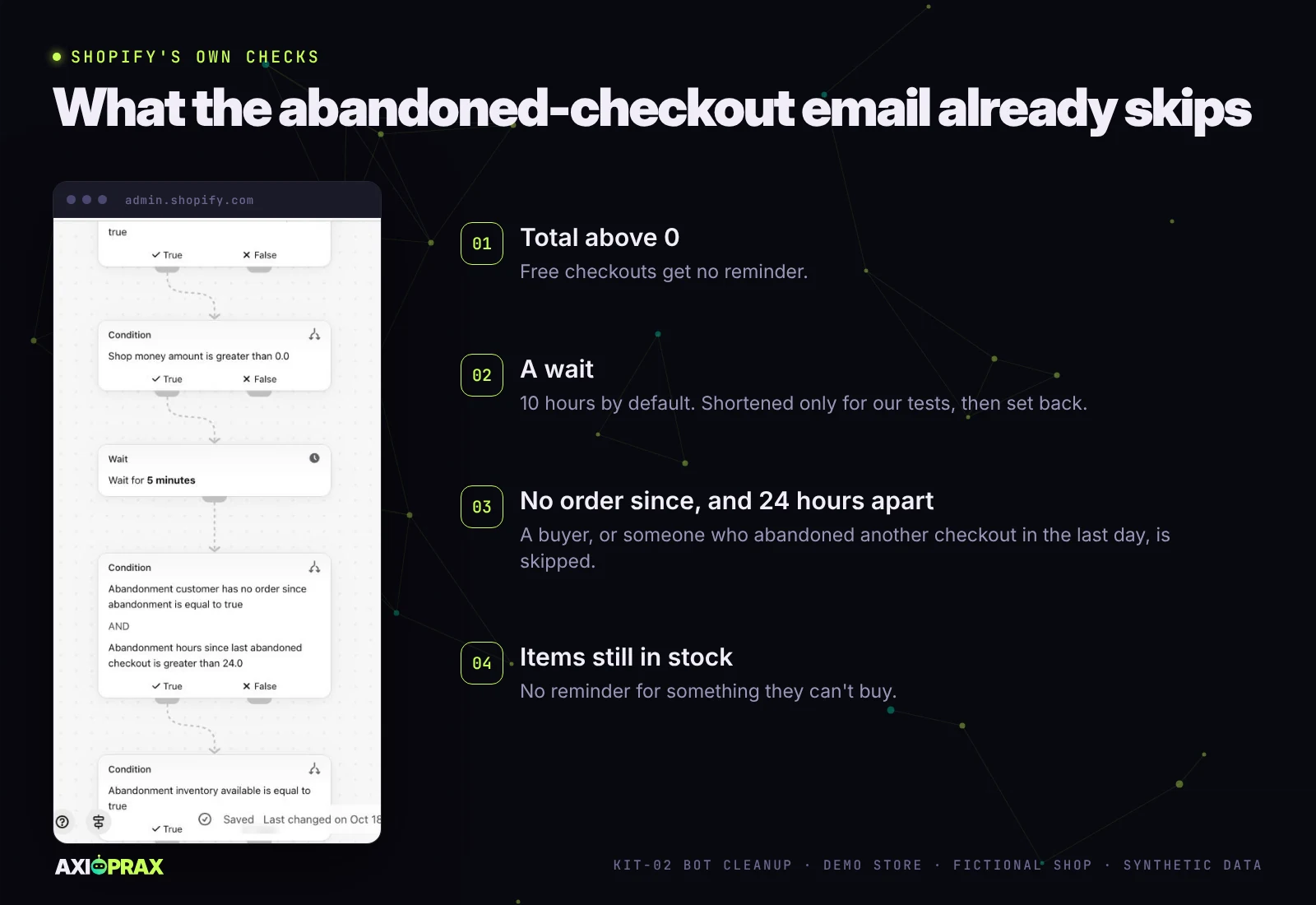
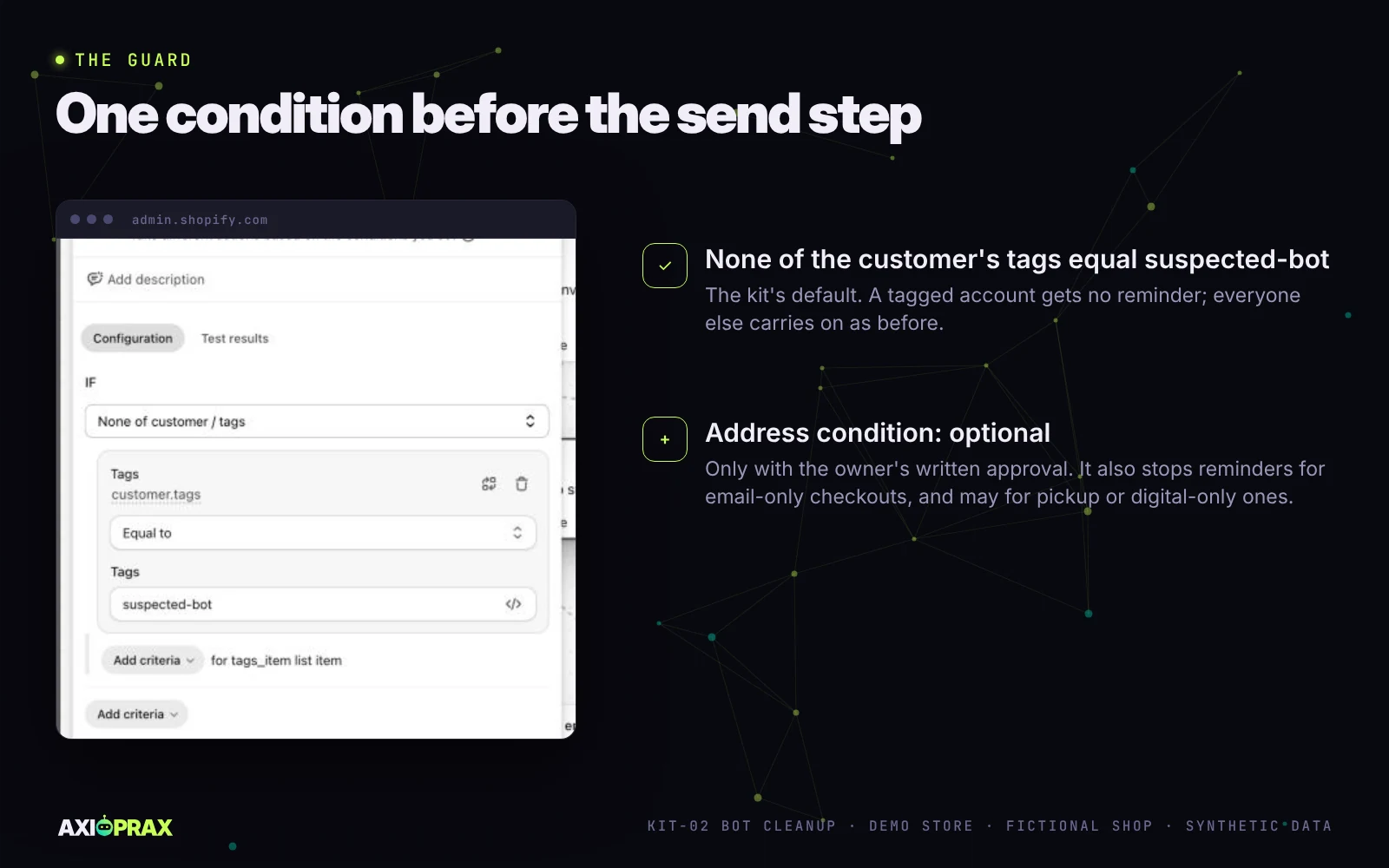
The kit's guard goes just before the send step, and it is a single condition: none of the customer's tags equal suspected-bot. An account carrying the tag gets no reminder. Everyone else carries on through Shopify's own checks as before.
Why is the guard tag-only by default?
Because the obvious extra check costs real reminders. Junk checkouts often stop after the email field, so it is tempting to send a reminder only when a shipping address has been filled in. Flow can do that. Its condition editor offered a "Not empty and exists" operator for the address line, which Shopify's conditions page doesn't list, so we tested it before trusting it.
The trouble is who else has no address. A real shopper who types an email and leaves before the address step gets no reminder, and that is exactly the path our test A took. Checkouts for local pickup, digital-only products or services may not ask for an address at all, so those shoppers would lose their reminder too. Shopify's help pages on pickup and digital products don't say whether checkout asks for an address, and we haven't run those checkouts through the condition.
So in the kit the address condition is optional. We add it only if the store owner approves it in writing after we have explained that trade-off, and we only suggest it for a store that ships every order and sees a lot of email-only junk checkouts. The tag-only guard has a smaller worst case. A real person who was tagged by mistake misses a reminder until the weekly review of the suspected-bot tag takes the tag off.
Did the guard work?
Yes, both ways, in two rounds of tests.
The first round, on 18 October, ran an earlier design that also needed a shipping address. Test A had an email and no address and stopped at the guard. Test B had a made-up Denver address and reached the send step. Both test customers were untagged, so those runs proved the address condition and said nothing about the tag. That gap is why we went back.
On 20 October we switched the demo store to the tag-only guard and shortened the wait to six minutes for the test. Test C was a customer of our own, tagged suspected-bot and subscribed, who started a checkout for a $699.95 board with a full address and left. Every earlier check came out true, the guard did not, and the run finished with no results: Send marketing email never ran. Test D was the control: untagged, an email and nothing else. Its run passed the guard and went on to the send step. Then we set the wait back to Shopify's 10 hours.
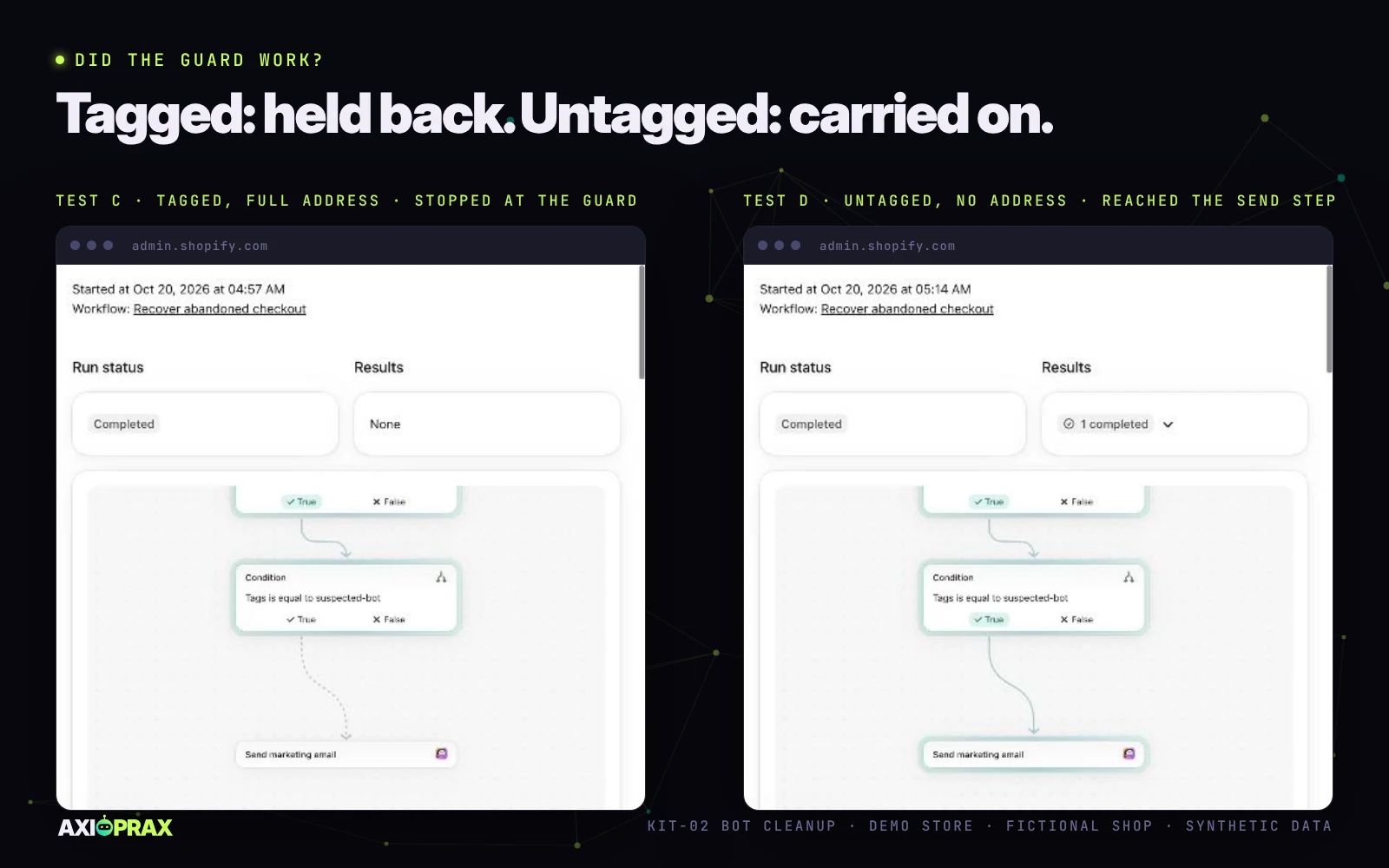
Test D's run tells you something about the address condition too. With the tag-only guard, a shopper who leaves after typing an email still gets to the reminder step, which is the point of keeping that condition optional. What we haven't confirmed is delivery. Flow recorded the send step, but we haven't checked that a development store's reminder actually lands in an inbox, so we read every result from the run log.
What if a real customer gets tagged?
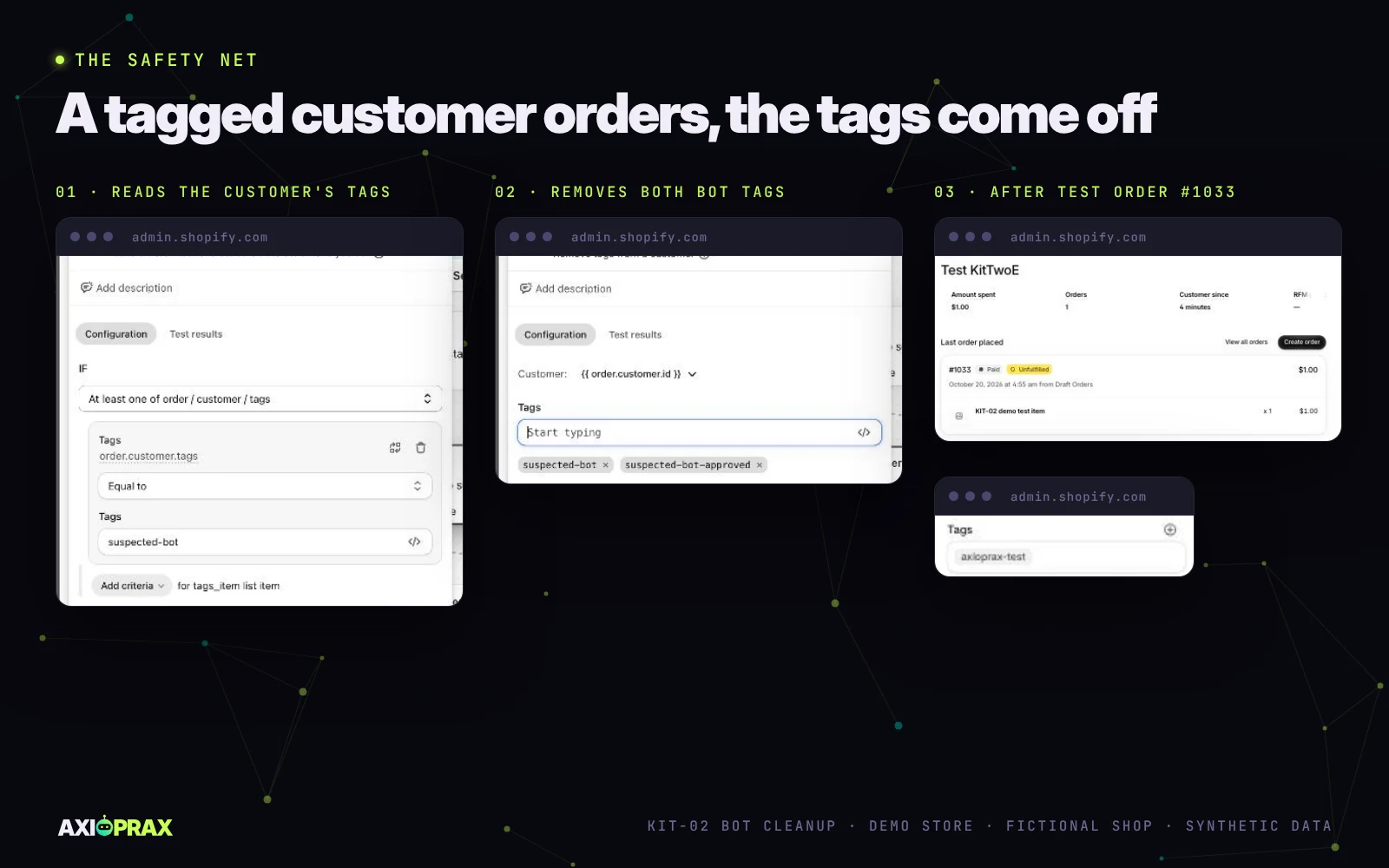
A third workflow takes the tag off. It runs on Order created, reads the customer's tags (not the order's, which is an easy field to pick by mistake), and removes both suspected-bot and the reviewed tag in one step, because anyone who buys counts as a real customer in this kit.
We tested it with a customer of our own carrying both tags. A $1 draft order, marked as paid, was enough: when we opened the customer again, only our test label was left. Shopify won't delete a customer who has an order, and we don't delete records anyway, so that test customer stays on the demo store. That is why the kit only runs this test on a client's store with their written OK.
One case we couldn't test: a brand-new customer on a listed domain who buys in the same moment they sign up, where both workflows fire at once. Shopify refused a draft order for our reserved test domain. The weekly review and the two protection segments catch that case either way.
What caught us out?
A few things in testing, all now in the runbook.
The storefront kept one checkout per browser, so starting test B at once would have overwritten test A. We waited until A showed as abandoned, which took longer than ten minutes, then cleared the cart.
Shopify's 24-hour rule meant two test checkouts from one customer wouldn't both send, which is why A and B used different addresses.
Double opt-in was another. Test A's customer record showed "Not subscribed" even though the box was ticked. We think the address was waiting for its confirmation email, but we haven't checked, so we read results from the Flow run log rather than an inbox.
The scoring workbook doesn't work in Google Sheets. Opened there, its protection check reads FAIL with a formula error and one sample row scores differently. It fails safe, so nobody can tag from a broken copy, but the kit uses LibreOffice only.
Shopify emailed our customer export instead of downloading it, with 46 customers. Its help page says exports of more than 50 are emailed, so plan for an email either way.
What the kit does not do
- It doesn't block bots. Nobody outside Shopify can stop traffic reaching a Shopify-hosted checkout. The kit cuts what bots cost you and how much they cloud your reports.
- No Cloudflare or firewall set-up in front of Shopify.
- No deleting. Axioprax never deletes customers, profiles or data. Removing records is the owner's own decision, done by hand, and Shopify won't delete anyone with an order anyway.
- No ad-account clean-up inside Meta or Google beyond leaving bot sources out of reporting.
- No shipping-address filter in Klaviyo. Its Started Checkout flow filters can only use top-level event properties, and shipping address isn't one of them (Klaviyo Help), so we use a subscriber and profile filter there instead.
- The demo used Shopify Messaging only. We haven't run the Klaviyo or Mailchimp steps on the demo store.
Is the kit a fit for your store?
- You are seeing fake customer accounts, junk abandoned checkouts, odd traffic spikes, or an email bill rising faster than sales.
- Your email tool is Klaviyo, Mailchimp or Shopify Messaging. Others get a custom quote.
- Your plan includes Shopify Flow, which Shopify lists as free on Basic, Grow, Advanced and Plus.
- Someone at the store can approve the list of suspected accounts in writing.
We work through a Shopify staff account and an email-tool user you invite, never an owner login, and no passwords by email. The kit is $349.
Getting started
If bots are filling your customer list or your email bill, see what is in the KIT-02 Bot Cleanup kit, then describe your store at axioprax.com/start. Tell us which email tool you use, roughly how many customers you have and what you are seeing. We confirm eligibility before you pay.
Frequently asked questions
Does Shopify's bot filtering block bots?
No. It filters identified bot sessions out of session reports by default, and you can show them again per report with the "Human or bot" filter. Orders, sales and customer counts aren't changed, so fake accounts stay in your customer list.
Can you block bots from my Shopify checkout?
No. Nobody outside Shopify can stop traffic reaching a Shopify-hosted checkout. We clean fake sign-ups out of your email list, tag suspected bot accounts for review and stop abandoned-checkout emails going to junk checkouts.
Will cleaning up bots lower my email bill?
It depends on the tool. Klaviyo doesn't bill suppressed profiles, and Mailchimp stops counting archived contacts but still counts unsubscribed ones. Shopify Messaging bills per email sent, so below its free monthly allowance the saving is $0. Your bot damage report shows the figure from your own plan.
Will you delete the fake customers?
No. Axioprax never deletes customers or data. We tag, suppress or archive them after you approve the list. If you want records removed, that is your decision and you do it by hand. Shopify says deleting a customer profile can't be undone, and customers with orders can't be deleted. Anyone with an order is protected and never flagged.
Will the abandoned-checkout guard stop reminders to real shoppers?
By default it only stops them for accounts tagged suspected-bot, so the worst case is a wrongly tagged person missing a reminder until the weekly review clears the tag. A shipping-address condition is optional, because it also stops reminders for shoppers who leave before the address step and for checkouts that may not ask for an address, such as local pickup, digital-only or service products. We add it only with your written approval.
Does it work with Klaviyo?
Yes, for suppressing approved junk profiles and filtering the abandoned-checkout flow to real subscribers. Klaviyo's Started Checkout filters can't see a shipping address, so the optional shipping-address condition is only possible in Shopify's own abandoned-checkout automation.
Do I need Shopify Plus?
No. Shopify lists Flow as a free app on Basic, Grow, Advanced and Plus. Our demo store is a Plus development store, and we check that Flow is installed on your store during the access check.
What this article is built on
Every vendor claim was read against its own page on 16 October 2026, and the claims about Shopify, Klaviyo and Mailchimp that we also make on the kit page were read again on 20 October 2026. Each community report is labelled as a report. Every demo result comes from our build log and captures for the demo store, recorded on 18 and 20 October 2026, with synthetic data and test customers of our own.
| # | Claim | Source | Checked | Status |
|---|---|---|---|---|
| 1 | Bot filtering applies only to session metrics; Shopify filters bots from analytics rather than blocking them | Shopify Help Center, bot filtering | 20 Oct 2026 | Verified |
| 2 | Rollout 21 to 23 September 2026; bot sessions filtered by default; per-report "Human or bot" filter; no classification before 7 October 2025 | Same page | 20 Oct 2026 | Verified |
| 3 | Orders, sales and customer counts aren't changed | Shopify changelog, session measurement improvements | 20 Oct 2026 | Verified |
| 4 | Abandoned checkouts from about 130 to more than 11,000; 2,066 bot accounts | Shopify Community, threads 684931 and 607939 | 18 Oct 2026 | Reported by merchants |
| 5 | Klaviyo doesn't bill suppressed profiles; Mailchimp bills unsubscribed contacts, not archived ones | Klaviyo Help; Mailchimp Help, pricing plans | 20 Oct 2026 | Verified |
| 6 | Shopify Messaging bills per email sent: 10,000 free a month, then $1 per 1,000 up to 300,000; abandoned-checkout automation emails don't count | Shopify Help Center, Shopify Messaging pricing | 20 Oct 2026 | Verified |
| 7 | Suspected bot and card-testing checkouts don't create abandoned checkouts; the automation sends to subscribers by default | Shopify Help Center, Customer abandons checkout; migrating abandoned checkout | 20 Oct 2026 | Verified |
| 8 | Customer created is documented for new orders and manual creation; it also fired on CSV import | Shopify Help Center, Customer created; demo store | 18 Oct 2026 | Verified; import observed |
| 9 | 17 of 17 imported fakes tagged; 0 of 4 genuine-style and 0 of 19 existing; 4 link-in-name rows refused at import | Demo store build log, synthetic data | 18 Oct 2026 | Observed |
| 10 | Customer email field deprecated in favour of the default email address | shopify.dev, Customer object | 16 Oct 2026 | Verified |
| 11 | Deleting a customer can't be undone; customers with orders can't be deleted | Shopify Help Center, manage customers | 16 Oct 2026 | Verified |
| 12 | Klaviyo Started Checkout filters use top-level properties only, with no shipping address | Klaviyo Help | 16 Oct 2026 | Partly verified: no shipping address listed among the filter properties |
| 13 | Optional address-plus-tag guard: test A (no address) stopped before the send step; test B's Send marketing email step completed. Both test customers were untagged | Demo store Flow run log | 18 Oct 2026 | Observed |
| 14 | Tag-only guard: test C (tagged, full address) stopped before the send step; test D (untagged, no address) reached it | Demo store Flow run log | 20 Oct 2026 | Observed |
| 15 | Pickup and digital-only checkouts carry no shipping address | Shopify Help pickup and digital pages don't say; only relevant to the optional address condition | 20 Oct 2026 | Not tested |
| 16 | Scoring workbook: 21 of 21 demo fakes flagged, 0 of 4 genuine-style; edge file buyer PROTECTED, a 9-sign-up real burst seven OK and two REVIEW, a 3-bot burst flagged | KIT-02 DEMO-IMPORT and EDGE-CASES workbooks, synthetic data | 18 Oct 2026 | Observed |
| 17 | Reminder email delivered from a development store | Not confirmed; results read from the Flow run log | 20 Oct 2026 | Not yet proven |
| 18 | Safety net removes the tags when a tagged customer orders; storefront sign-up and the newsletter form | Demo store test order (safety net); sign-up and newsletter form not testable on the demo store | 20 Oct 2026 | Safety net observed; sign-up not tested |
| 19 | Flow runs on a Plus development store | Demo store; other development stores not documented | 18 Oct 2026 | Observed, Plus only |
| 20 | Domain segment returned 9; both protection segments returned 0; real export in both CSV formats gave identical scores, every customer with an order PROTECTED | Demo store segments; KIT-02 loader | 20 Oct 2026 | Observed |
| 21 | Workbook in Google Sheets: protection check FAIL, one row scored differently | Demo copy in Google Sheets | 20 Oct 2026 | Observed |
| 22 | Customer created also runs for customers made by a storefront checkout | Demo store Flow run times; the run list does not name the customer | 20 Oct 2026 | Inferred from timing |